Monroe County Sheriff’s deputies found eight debit cards and three driver’s licenses belonging to other people in (Jamal Denzel) Austin’s possession during a traffic stop for reckless driving and failing to maintain lane on Jan. 19, 2020. A subsequent investigation revealed that Austin, who worked at an Atlanta club, had used two stolen identities to register two separate fictious (sic) businesses with the Georgia Secretary of State’s Office to obtain two Capital One business credit cards with credit limits of $30,000 and $20,000.
The investigation, which also included participation by the United States Secret Service and other local, state, and federal agencies, also uncovered a stolen $49,000 check.
Well, Austin lost the stolen money and his freedom. He was sentenced to 48 months in federal prison.
Now I’ll grant the early stages of this investigation aren’t as sexy as other fraud detection methods, but it worked.
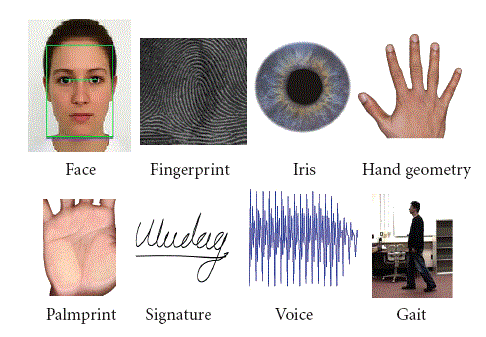
While searching for a post-COVID article that discussed the use of biometrics in education (to supplement my existing educational identity information), I found an entire scientific paper on the topic.
Educational institutions are acquiring novel technologies to help make their processes more efficient and services more attractive for both students and faculty. Biometric technology is one such example that has been implemented in educational institutions with excellent results. In addition to identifying students, access control, and personal data management, it has critical applications to improve the academic domain’s teaching/learning processes. Identity management system, class attendance, e-evaluation, security, student motivations, and learning analytics are areas in which biometric technology is most heavily employed.
Hmm…I didn’t even think about class attendance. But a camera capturing faces that walk into the classroom or join the online webinar should do the trick.
Approximately 2,700 years ago, the Greek poet Hesiod is recorded as saying “moderation is best in all things.” This applies to government regulations, including encryption and age verification regulations. As the United Kingdom’s House of Lords works through drafts of its Online Safety Bill, interested parties are seeking to influence the level of regulation.
In Allan’s assessment, he wondered whether the mandated encryption and age verification regulations would apply to all services, or just critical services.
Allan considered a number of services, but I’m just going to hone in on two of them: WhatsApp and Wikipedia.
The Online Safety Bill and WhatsApp
WhatsApp is owned by a large American company called Meta, which causes two problems for regulators in the United Kingdom (and in Europe):
Meta is a large company.
Meta is an American company.
WhatsApp itself causes another problem for UK regulators:
WhatsApp encrypts messages.
Because of these three truths, UK regulators are not necessarily inclined to play nice with WhatsApp, which may affect whether WhatsApp will be required to comply with the Online Safety Bill’s regulations.
Allan explains the issue:
One of the powers the Bill gives to OFCOM (the UK Office of Communications) is the ability to order services to deploy specific technologies to detect terrorist and child sexual exploitation and abuse content….
But there may be cases where a provider believes that the technology it is being ordered to deploy would break essential functionality of its service and so would prefer to leave the UK rather than accept compliance with the order as a condition of remaining….
If OFCOM does issue this kind of order then we should expect to see some encrypted services leave the UK market, potentially including very popular ones like WhatsApp and iMessage.
Speaking during a UK visit in which he will meet legislators to discuss the government’s flagship internet regulation, Will Cathcart, Meta’s head of WhatsApp, described the bill as the most concerning piece of legislation currently being discussed in the western world.
He said: “It’s a remarkable thing to think about. There isn’t a way to change it in just one part of the world. Some countries have chosen to block it: that’s the reality of shipping a secure product. We’ve recently been blocked in Iran, for example. But we’ve never seen a liberal democracy do that.
“The reality is, our users all around the world want security,” said Cathcart. “Ninety-eight per cent of our users are outside the UK. They do not want us to lower the security of the product, and just as a straightforward matter, it would be an odd choice for us to choose to lower the security of the product in a way that would affect those 98% of users.”
In passing, the March Guardian article noted that WhatsApp requires UK users to be 16 years old. This doesn’t appear to be an issue for Meta, but could be an issue for another very popular online service.
The Online Safety Bill and Wikipedia
So how does the Online Safety Bill affect Wikipedia?
It depends on how the Online Safety Bill is implemented via the rulemaking process.
As in other countries, the true effects of legislation aren’t apparent until the government writes the rules that implement the legislation. It’s possible that the rulemaking will carve out an exemption allowing Wikipedia to NOT enforce age verification. Or it’s possible that Wikipedia will be mandated to enforce age verification for its writers.
If they do not (carve out exemptions) then there could be real challenges for the continued operation of some valuable services in the UK given what we know about the requirements in the Bill and the operating principles of services like Wikipedia.
For example, it would be entirely inconsistent with Wikipedia’s privacy principles to start collecting additional data about the age of their users and yet this is what will be expected from regulated services more generally.
Left unsaid is the same issue that affects encryption: age verification for Wikipedia may be required in the United Kingdom, but may not be required for other countries.
(Wales) used the example of Wikipedia, in which none of its 700 staff or contractors plays a role in content or in moderation.
Instead, the organisation relies on its global community to make democratic decisions on content moderation, and have contentious discussions in public.
By contrast, the “feudal” approach sees major platforms make decisions centrally, erratically, inconsistently, often using automation, and in secret.
By regulating all social media under the assumption that it’s all exactly like Facebook and Twitter, Wales said that authorities would impose rules on upstart competitors that force them into that same model.
One common thread between these two cases is that implementation of the regulations results in a privacy threat to the affected individuals.
For WhatsApp users, the privacy threat is obvious. If WhatsApp is forced to fully or partially disable encryption, or is forced to use an encryption scheme that the UK Government could break, then the privacy of every message (including messages between people outside the UK) would be threatened.
For Wikipedia users, anyone contributing to the site would need to undergo substantial identity verification so that the UK Government would know the ages of Wikipedia contributors.
This is yet another example of different government agencies working at cross purposes with each other, as the “catch the pornographers” bureaucrats battle with the “preserve privacy” advocates.
Meta, Wikipedia, and other firms would like the legislation to explicitly carve out exemptions for their firms and services. Opponents say that legislative carve outs aren’t necessary, because no one would ever want to regulate Wikipedia.
Yeah, and the U.S. Social Security Number isn’t an identificaiton number either. (Not true.)
Whether a student is attending a preschool, a graduate school, or something in between, the educational institution needs to know who is accessing their services. This post discusses the types of identity verification and authentication that educational institutions may employ.
Why do educational institutions need to verify and authenticate identities?
Whether little Johnny is taking his blanket to preschool, or Johnny’s mother is taking her research notes to the local university, educational institutions such as schools, colleges, and universities need to know who the attendees are. It doesn’t matter whether the institution has a physical campus, like Chaffey High School’s campus in the video above, or if the institution has a virtual campus in which people attend via their computers, tablets, or phones.
Access boils down to two questions:
Who is allowed within the educational institution?
Who is blocked from the educational institution?
Who is allowed within the educational institution?
Regardless of the type of institution, there are certain people who are allowed within the physical and/or virtual campus.
Students.
Instructors, including teachers, teaching assistants/aides, and professors.
Administrators.
Staff.
Parents of minor students (but see below).
Others.
All of these people are entitled to access to at least portions of the campus, with different people having access to different portions of the campus. (Students usually can’t enter the teacher’s lounge, and hardly anybody has full access to the computer system where grades are kept.)
Before anyone is granted campus privileges, they have to complete identity verification. This may be really rigorous, but in some cases it can’t be THAT rigorous (how many preschoolers have a government ID?). Often, it’s not rigorous at all (“Can you show me a water bill? Is this your kid? OK then.”).
Once an authorized individual’s identity is verified, they need to be authenticated when they try to enter the campus. This is a relatively new phenomenon, in response to security threats at schools. Again, this could be really rigorous. For example, when students at a University of Rhode Island dining hall want to purchase food from the cafeteria, many of then consent to have their fingerprints scanned.
But some authentiation is much less rigorous. In these cases, people merely show an ID (hopefully not a fake ID) to authenticate themselves, or a security guard says “I know Johnny.”
(Again, all this is new. Many years ago, I accompanied a former college classmate to a class at his new college, the College of Marin. If I had kept my mouth shut, the professor wouldn’t have known that an unauthenticated student was in his class.)
Who is blocked from the educational institution?
At the same time, there are people who are clearly NOT allowed within the physical and/or virtual campus. Some of these people can enter campus with special permission, while some are completely blocked.
Former students. Once a student graduates, their privileges are usually revoked, and they need special permission if they want to re-enter campus to visit teachers or friends. (Admittedly this isn’t rigorously enforced.)
Expelled students. Well, some former students have a harder time returning to campus. If you brought a gun on campus, it’s going to be much harder for you to re-enter.
Former instructors, administrators, and staff. Again, people who leave the employ of the institution may not be allowed back, and certain ones definitely won’t be allowed back.
Non-custodial parents of minor students. In some cases, a court order prohibits a natural parent from contact with their child. So the educational institutions are responsible for enforcing this court order and ensuring that the minor student leaves campus only with someone who is authorized to take the child.
Others.
So how do you keep these people off campus? There are two ways.
If they’re not on the allowlist, they can’t enter campus anyway. As part of the identity verification process for authorized individuals, there is a list of people who can enter the campus. By definition, the 8 billion-plus people who are not on that “allowlist” can’t get on campus without special permission.
Sometimes they can be put on a blocklist. Or maybe you want to KNOW that certain people can’t enter campus. The inverse of an allowlist, people who are granted access, is a blocklist, people who are prevented from getting access. (You may know “blocklist” by the older term “blacklist,” and “allowlist” by the older term “whitelist.” The Security Industry Association and the National Institute of Standards and Technology recommend updated terminology.)
There’s just one teeny tiny problem with blocklists. Sometimes they’re prohibited by law.
In some cases (but not in others), a person is required to give consent before they are enrolled in a biometric system. If you’re the ex-student who was expelled for brining a gun on campus, how motivated will you be to allow that educational institution to capture your biometrics to keep you off campus?
And yes, I realize that the expelled student’s biometrics were captured while they were a student, but once they were no longer a student, the institution would have on need to retain those biometrics. Unless they felt like it.
This situation becomes especially sticky for campuses that use video surveillance systems. Like Chaffey High School.
Chaffey High School, Ontario, California.
Now the mere installation of a video surveillance system does not (usually) result in legally prohibited behavior. It just depends upon what is done with the video.
If the video is not integrated with a biometric facial recognition system, there may not be an issue.
If Chaffey High School has its own biometric facial recognition system, then a whole host of legal factors may come into play.
If Chaffey High School does not have a biometric facial recognition system, but it gives the video to a police agency or private entity that does have a biometric facial recognition system, then some legal factors may emerge.
As you can see, educational identity is not as clear-cut as financial identity, both because financial institutions are more highly regulated and because blocklists are more controversial in educational identity. Vladimir Putin may not be able to open a financial account at a U.S. bank, but I bet he’d be allowed to enroll in an online course at a U.S. community college.
So if you are an educational institution or an identity firm who serves educational institutions, people who write for you need to know all of these nuances.
You need to provide the right information to your customers, and write it in a way that will motivate your customers to take the action you want them to take.
Speaking of motivating customers, are you with an identity firm or educational institution and need someone to write your marketing text?
Someone with 29 years of identity/biometric marketing experience?
Someone who understands that technological, organizational, and legal issues surrounding the use of identity solutions?
Someone who will explain why your customers should care about these issues, and the benefits a compliant solution provides to them?
If I can help you create your educational identity content, we need to talk.
Bank of America, Euclid Avenue, Ontario, California.
Here’s a sign of the times from Ontario, California. The sign at the end of this video appears on the door of a bank branch in downtown Ontario, and basically says that if you wanted to go to THIS branch on Saturday, you’re out of luck.
Of course, that assumes that you actually WANT to go to a physical bank branch location. Unlike the old days, when banks were substantive buildings that you visited to deposit and withdraw money, now banks can be found in our smartphones.
What locational, technological, and organizational changes have taken place at banks over the last 50 years? And now that you can open an account to buy crypto on your smartphone, does your financial institution’s onboarding solution actually WORK in determining financial identity?
Three changes in banking over the last fifty years
Over the last fifty years, banking has changed to the point where someone from 1973 wouldn’t even recognize “banking” today. Stick around to see a video from a company called “Apple” showing you how to use a “wallet” on a “smartphone” to pay for things even if you’re not carrying your “chip card.” Karl Malden would be spinning in his grave. So let’s talk about the three changes:
The locational change.
The technological change.
The organizational change.
The locational change: from stand-alone buildings to partitioned grocery store sections
When I was growing up, a “bank” (or a “savings & loan,” which we will discuss later) was located in a building where you would go on weekdays (or even Saturdays!) and give money to, or get money from, a person referred to as a teller.
There was this whole idea of “going to the bank,” perhaps on your lunch hour because you couldn’t go to the bank on Sunday at midnight, could you?
The first crack in the whole idea of “going to the bank” was the ability to bank without entering the door of the bank…and being able to bank on Sunday at midnight if you felt like it. Yes, I’m talking about Automated Teller Machines (ATMs), where the “teller,” instead of being a person, was a bunch of metal and a TV screen. The first ATM appeared in 1967, but they didn’t really become popular until several years later.
For the most part, these ATMs were located at the bank buildings themselves. But those buildings were costly, and as competition between banks increased, banks sought alternatives. By 1996, a new type of banking location emerged (PDF):
The largest U.S. commercial banks are restructuring their retail operations to reduce the cost disadvantage resulting from a stagnant deposit base and stiffer competition. As part of this effort, some banks are opening “supermarket,” or “in-store,” branches: a new type of banking office within a large retail outlet. An alternative to the traditional bank office, the supermarket branch enables banks to improve the efficiency of the branch network and offer greater convenience to customers.
To traditionalists, these bank branches looked pretty flimsy. Where are the brick and (fake) marble walls that protect my cash? Heck, anyone can walk into the store and just steal all my money, right?
Well, these newfangled bank branches apparently WERE able to protect our cash, and the idea of banking right in the grocery store proved to be very popular because of its convenience.
But the changes were just beginning.
The technological change: from store sections to smartphones
As banks changed where they were located, there were technological changes also.
During the 1990s, more and more people were using home computers. As the computers and their security became more and more sophisticated, some people asked why we needed to “go to the bank” (either a stand-alone building or a partitioned area next to the cigarettes) at all. Why not just bank at the computer? So PC banking emerged.
The term “PC banking” refers to the online access of banking information from a personal computer. A solution for both personal or business banking needs, this type of financial management allows you to conduct transactions using an Internet connection and your computer in lieu of a trip to the local bank branch or the use of an ATM. PC banking enables an account holder to perform real-time account activities and effectively manage finances in a way that avoids the hassle of daytime bank visits and eliminates the postage required to pay bills by mail.
Ah yes; there was another benefit. You could use the computer to pay your bills electronically. The U.S. Postal Service was NOT a fan of this change.
As we crossed into the new millennium, the online banking ideas got even wilder. Cellular telephones, which followed a modified version of the “Princess phone” form factor, became more complex devices with their own teeny-tiny screens, just like their larger computer cousins. Eventually, banks began offering their services on these “smartphones,” so that you didn’t even need a computer to perform your banking activities.
Imagine putting the video below on 8mm film and traveling back in time to show it to a 1973 banking customer. They would have no idea what was going on in the film.
But are PC and smartphone banking secure? After all, smartphones don’t have brick or (fake) marble walls. We’ll get to that question.
The organizational change: from banks to…who knows what?
The third change was not locational or technological, but a change in terms of business organization. Actually, many changes.
Back in 1973, the two major types of banks were banks, and something called “savings & loans.” Banks had been around for centuries, but savings & loans were a little newer, having started in 1831. They were regulated a little differently: banks were insured by the FDIC, S&Ls by the FSLIC.
Everything was all hunky dory until the 1980s, when the S&Ls started collapsing. This had monumental effects; for example, this PDF documenting the S&L crisis is hosted on the FDIC website, because the FSLIC was abolished many years ago.
After savings & loans became less popular, other “banks” emerged.
Members-only associations called credit unions had started in 1864, and in the United States they had their own government-sponsored insurance, separate from the FDIC and FSLIC.
But there was one similarity between banks, savings & loans, credit unions, and payday loans. They all dealt in U.S. dollars (or the currency of the nation where they were located).
Enter the crypto providers, who traded cryptocurrencies that weren’t backed by any government. Since they were very new entrants, they didn’t have to make the locational and technological changes that banks and related entities had to make; they zoomed straight to the newest methods. Everything was performed on your smartphone (or computer), and you never went to a physical place.
Now, let’s open a financial account
Back in 1973, the act of opening an account required you to travel to a bank branch, fill out some forms, and give the teller some form of U.S. dollars.
You can still do that today, for the most part. But it was hard to do that in the summer and fall of 2020 when Bredemarket started.
Bredemarket pretty much started because of the COVID-19 pandemic, and those first few months of Bredemarket’s existence were adversely affected by COVID-19. When I wanted to start a bank account for Bredemarket, I COULDN’T travel to my nearby bank branch to open an account. I HAD to open my account with my computer.
So, without a teller (human or otherwise) even meeting me, I had to prove that I was a real person, and give my bank enough information during onboarding so that they knew I wasn’t a money-laundering terrorist. Banks had to follow government regulations (know your customer, anti-money laundering, know your business), even in the midst of a worldwide pandemic.
This onboarding process had to be supported whether you were or were not at a physical location of a financial institution.
Whether you were conducting business in person, on a computer, or on a smartphone.
Whether you were working with U.S. dollars or (as crypto regulations tightened) something named after a dog or an entire planet or whatever.
How can you support all that?
Liminal’s “Link™ Index for Account Opening in Financial Services”
Back in 2020 when I was onboarding the new-fashioned way, I had no way of predicting that in less than two years, I would be working for a company that helped financial institutions onboard customers the new-fashioned way.
At the time, I estimated that there were over 80 companies that provided such services.
According to Liminal, my estimate was too low. Or maybe it was too high.
Liminal’s July 2023 report, “Link™ Index for Account Opening in Financial Services,” covers companies that provide onboarding services that allow financial institutions to use their smartphone apps (or web pages) to sign up new clients.
Account opening solutions for the financial services industry are critical to ensuring compliance and preventing fraud, enabling companies to effectively identify new users during customer registration and deliver a seamless onboarding experience. The primary purpose of these solutions is to facilitate mandatory compliance checks, with a particular emphasis on the Know Your Customer (KYC) process.
If I can summarize KYC in layperson terms, it basically means that the person opening a financial institution account is who they say they are. For example, it ensures that Vladimir Putin can’t open a U.S. bank acccount under the name “Alan Smithee” to evade U.S. bans on Russian national transctions.
Remember how I found over 80 identify proofing vendors? Liminal found a few more who claimed to offer identity proofing, but thinks that less than 80 firms can actually deliver.
Around 150 vendors claim to offer account opening compliance and fraud solutions in banking, but only 32 (21.3%) have the necessary product features to meet buyer demands.
Now I have not purchased the entire Liminal report, and even the Executive Summary (which I do have) is “privileged and confidential” so I can’t reprint it here. But I guess that I can say that Liminal used something called the “Link Score” to determine which vendors made the top category, and which didn’t.
I’m not sure how the vendors who DIDN’T make the top category are reacting to their exclusion, but I can bet that they’re not happy.
Writing about Financial Identity
As you can gather, there are a number of issues that you have to address if you want to employ identity proofing at a financial institution.
And if you’re an identity firm or financial institution, you need to provide the right information to your customers, and write it in a way that will motivate your customers to take the action you want them to take.
Speaking of motivating customers, are you with an identity firm or financial institution and need someone to write your marketing text?
Someone with 29 years of identity/biometric marketing experience?
Someone who consistently tosses around acronyms like ABM, FRVT, KYB, KYC, and PAD, but who would never dump undefined acronyms on your readers? (If you’re not a financial/identity professional and don’t know these acronyms, they stand for anti-money laundering, Face Recognition Vendor Test, Know Your Business, Know Your Customer, and Presentation Attack Detection.)
Someone who will explain why your customers should care about these acronyms, and the benefits a compliant solution provides to them?
If I can help you create your financial identity content, we need to talk.
As some of you know, I’m seeking full-time employment after my former employer let me go in late May. As part of my job search, I was recently invited to a second interview for a company in my industry. Before that interview, I made an important decision about how I was going to present myself.
If you’ve read any of Bredemarket’s content, there are times when it takes a light tone, in which wildebeests roam the earth while engaging in marketing activities such as elaborating the benefits of crossing the stream.
Some of that DOES NOT fly in the corporate world. (For most companies, anyway.) If you analyze a wide selection of corporate blogs, you won’t see the word “nothingburger.” But you do here.
So as I prepared for this important job interview, I made sure that I was ready to discuss the five factors of authentication, and my deep experience as an identity content marketing expert with many of those factors.
The five factors of authentication, of course, are:
For the purposes of this job interview, there isn’t! I confined myself to the five factors only during the discussion, using examples such as passwords, driver’s licenses, faces, actions, and smartphone geolocation information.
But in the end, my caution was of no avail. I DIDN’T make it to the next stage of interviews.
Maybe I SHOULD have mentioned “Somewhat you why” after all.
It’s been years since I talked about Identity Assurance Levels (IALs) in any detail, but I wanted to delve into two of the levels and see when IAL3 is necessary, and when it is not.
The U.S. National Institute of Standards and Technology has defined “identity assurance levels” (IALs) that can be used when dealing with digital identities. It’s helpful to review how NIST has defined the IALs.
Assurance in a subscriber’s identity is described using one of three IALs:
IAL1: There is no requirement to link the applicant to a specific real-life identity. Any attributes provided in conjunction with the subject’s activities are self-asserted or should be treated as self-asserted (including attributes a [Credential Service Provider] CSP asserts to an [Relying Party] RP). Self-asserted attributes are neither validated nor verified.
IAL2: Evidence supports the real-world existence of the claimed identity and verifies that the applicant is appropriately associated with this real-world identity. IAL2 introduces the need for either remote or physically-present identity proofing. Attributes could be asserted by CSPs to RPs in support of pseudonymous identity with verified attributes. A CSP that supports IAL2 can support IAL1 transactions if the user consents.
IAL3: Physical presence is required for identity proofing. Identifying attributes must be verified by an authorized and trained CSP representative. As with IAL2, attributes could be asserted by CSPs to RPs in support of pseudonymous identity with verified attributes. A CSP that supports IAL3 can support IAL1 and IAL2 identity attributes if the user consents.
For purposes of this post, IAL1 is (if I may use a technical term) a nothingburger. It may be good enough for a Gmail account, but these days even social media accounts are more likely to require IAL2.
So what’s the practical difference between IAL2 and IAL3?
If we ignore IAL1 and concentrate on IAL2 and IAL3, we can see one difference between the two. IAL2 allows remote, unsupervised identity proofing, while IAL3 requires (in practice) that any remote identity proofing is supervised.
Much of my time at my previous employer Incode Technologies involved unsupervised remote identity proofing (IAL2). For example, if a woman wants to set up an account at a casino, she can complete the onboarding process to set up the account on her phone, without anyone from the casino being present to make sure she wasn’t faking her face or her ID. (Fraud detection is the “technologies” part of Incode Technologies, and that’s how they make sure she isn’t faking.)
SRIP provides remote supervision of in-person proofing using NextgenID’s Identity Stations, an all-in-one system designed to securely perform all enrollment processes and workflow requirements. The station facilitates the complete and accurate capture at IAL levels 1, 2 and 3 of all required personal identity documentations and includes a full complement of biometric capture support for face, fingerprint, and iris.
Now there are some other differences between IAL2 and IAL3 in terms of the proofing, so NIST came up with a handy dandy chart that allows you to decide which IAL level you need.
At this point, the agency understands that some level of proofing is required. Step 3 is intended to look at the potential impacts of an identity proofing failure to determine if IAL2 or IAL3 is the most appropriate selection. The primary identity proofing failure an agency may encounter is accepting a falsified identity as true, therefore providing a service or benefit to the wrong or ineligible person. In addition, proofing, when not required, or collecting more information than needed is a risk in and of itself. Hence, obtaining verified attribute information when not needed is also considered an identity proofing failure. This step should identify if the agency answered Step 1 and 2 incorrectly, realizing they do not need personal information to deliver the service. Risk should be considered from the perspective of the organization and to the user, since one may not be negatively impacted while the other could be significantly harmed. Agency risk management processes should commence with this step.
Even with the complexity of the flowchart, some determinations can be pretty simple. For example, if any of the six risks listed under question 3 are determined to be “high,” then you must use IAL3.
But the whole exercise is a lot to work through, and you need to work through it yourself. When I pasted the PNG file for the flowchart above into this blog post, I noticed that the filename is “IAL_CYOA.png.” And we all know what “CYOA” means.
But if you do the work, you’ll be better informed on the procedures you need to use to verify the identities of people.
One footnote: although NIST is a U.S. organization, its identity assurance levels (including IAL2 and IAL3) are used worldwide, including by the World Bank. So everyone should be familiar with them.
Depending upon whom you ask, there are either three or five factors of authentication.
Unless you ask me.
I say that there are six.
Let me explain.
First I’ll discuss what factors of authentication are, then I’ll talk about the three factor and five factor school, then I’ll briefly review my thoughts on the sixth factor—now that I know what I’ll call it.
For example, if Warren Buffett has a bank account, and I claim that I am Warren Buffett and am entitled to take money from that bank account, I must complete an authentication process to determine whether I am entitled to Warren Buffett’s money. (Spoiler alert: I’m not.)
An authentication factor is a special category of security credential that is used to verify the identity and authorization of a user attempting to gain access, send communications, or request data from a secured network, system or application….Each authentication factor represents a category of security controls of the same type.
When considering authentication factors, the whole group/category/type definition is important. For example, while a certain system may require both a 12-character password and a 4-digit personal identification number (PIN), these are pretty much the same type of authentication. It’s just that the password is longer than the PIN. From a security perspective, you don’t gain a lot by requiring both a password and a PIN. You would gain more by choosing a type of authentication that is substantially different from passwords and PIN.
How many factors of authentication are there?
So how do we define the factors of authentication? Different people have different definitions.
Factors include: (i) something you know (e.g. password/personal identification number (PIN)); (ii) something you have (e.g., cryptographic identification device, token); or (iii) something you are (e.g., biometric).
Note that NIST’s three factors are very different from one another. Knowing something (such as a password or a PIN) differs from having something (such as a driver’s license) or being something (a fingerprint or a face).
But some people believe that there are more than three factors of authentication.
Over the months, I struggled through some examples of the “why” factor.
Why is a person using a credit card at a McDonald’s in Atlantic City? (Link) Or, was the credit card stolen, or was it being used legitimately?
Why is a person boarding a bus? (Link) Or, was the bus pass stolen, or was it being used legitimately?
Why is a person standing outside a corporate office with a laptop and monitor? (Link) Or, is there a legitimate reason for an ex-employee to gain access to the corporate office?
As I refined my thinking, I came to the conclusion that “why” is a reasonable factor of authentication, and that this was separate from the other authentication factors (such as “something you do”).
And the sixth factor of authentication is called…
You’ll recall that I wanted to cast this sixth authentication factor into the “some xxx you xxx” format.
So, as of today, here is the official Bredemarket list of the six factors of authentication:
Something you know.
Something you have.
Something you are.
Something you do.
Somewhere you are.
(Drumroll…)
Somewhat you why.
Yes, the name of this factor stands out from the others like a sore thumb (probably a loop).
However, the performance of this factor stands out from the others. If we can develop algorithms that accurately measure the “why” reasonableness of something as a way to authenticate identity, then our authentication capabilities will become much more powerful.
I’ll admit that I previously thought that age estimation was worthless, but I’ve since changed my mind about the necessity for it. Which is a good thing, because the U.S. National Institute of Standards and Technology (NIST) is about to add age estimation to its Face Recognition Vendor Test suite.
What is age estimation?
Before continuing, I should note that age estimation is not a way to identify people, but a way to classify people. For once, I’m stepping out of my preferred identity environment and looking at a classification question. Not “gender shades,” but “get off my lawn” (or my tricycle).
Age estimation uses facial features to estimate how old a person is, in the absence of any other information such as a birth certificate. In a Yoti white paper that I’ll discuss in a minute, the Western world has two primary use cases for age estimation:
First, to estimate whether a person is over or under the age of 18 years. In many Western countries, the age of 18 is a significant age that grants many privileges. In my own state of California, you have to be 18 years old to vote, join the military without parental consent, marry (and legally have sex), get a tattoo, play the lottery, enter into binding contracts, sue or be sued, or take on a number of other responsibilities. Therefore, there is a pressing interest to know whether the person at the U.S. Army Recruiting Center, a tattoo parlor, or the lottery window is entitled to use the service.
Second, to estimate whether a person is over or under the age of 13 years. Although age 13 is not as great a milestone as age 18, this is usually the age at which social media companies allow people to open accounts. Thus the social media companies and other companies that cater to teens have a pressing interest to know the teen’s age.
Why was I against age estimation?
Because I felt it was better to know an age, rather than estimate it.
My opinion was obviously influenced by my professional background. When IDEMIA was formed in 2017, I became part of a company that produced government-issued driver’s licenses for the majority of states in the United States. (OK, MorphoTrak was previously contracted to produce driver’s licenses for North Carolina, but…that didn’t last.)
With a driver’s license, you know the age of the person and don’t have to estimate anything.
And estimation is not an exact science. Here’s what Yoti’s March 2023 white paper says about age estimation accuracy:
Our True Positive Rate (TPR) for 13-17 year olds being correctly estimated as under 25 is 99.93% and there is no discernible bias across gender or skin tone. The TPRs for female and male 13-17 year olds are 99.90% and 99.94% respectively. The TPRs for skin tone 1, 2 and 3 are 99.93%, 99.89% and 99.92% respectively. This gives regulators globally a very high level of confidence that children will not be able to access adult content.
Our TPR for 6-11 year olds being correctly estimated as under 13 is 98.35%. The TPRs for female and male 6-11 year olds are 98.00% and 98.71% respectively. The TPRs for skin tone 1, 2 and 3 are 97.88%, 99.24% and 98.18% respectively so there is no material bias in this age group either.
Yoti’s facial age estimation is performed by a ‘neural network’, trained to be able to estimate human age by analysing a person’s face. Our technology is accurate for 6 to 12 year olds, with a mean absolute error (MAE) of 1.3 years, and of 1.4 years for 13 to 17 year olds. These are the two age ranges regulators focus upon to ensure that under 13s and 18s do not have access to age restricted goods and services.
While this is admirable, is it precise enough to comply with government regulations? Mean absolute errors of over a year don’t mean a hill of beans. By the letter of the law, if you are 17 years and 364 days old and you try to vote, you are breaking the law.
Why did I change my mind?
Over the last couple of months I’ve thought about this a bit more and have experienced a Jim Bakker “I was wrong” moment.
How many 13 year olds do you know that have driver’s licenses? Probably none.
How many 13 year olds do you know that have government-issued REAL IDs? Probably very few.
How many 13 year olds do you know that have passports? Maybe a few more (especially after 9/11), but not that many.
Even at age 18, there is no guarantee that a person will have a government-issued REAL ID.
So how are 18 year olds, or 13 year olds, supposed to prove that they are old enough for services? Carry their birth certificate around?
You’ll note that Yoti didn’t target a use case for 21 year olds. This is partially because Yoti is a UK firm and therefore may not focus on the strict U.S. laws regarding alcohol, tobacco, and casino gambling. But it’s also because it’s much, much more likely that a 21 year old will have a government-issued ID, eliminating the need for age estimation.
Sometimes.
In some parts of the world, no one has government IDs
Over the past several years, I’ve analyzed a variety of identity firms. Earlier this year I took a look at Worldcoin. While Worldcoin’s World ID emphasizes privacy so much that it does not conclusively prove a person’s identity (it only proves a person’s uniqueness), and makes no attempt to provide the age of the person with the World ID, Worldcoin does have something to say about government issued IDs.
Online services often request proof of ID (usually a passport or driver’s license) to comply with Know your Customer (KYC) regulations. In theory, this could be used to deduplicate individuals globally, but it fails in practice for several reasons.
KYC services are simply not inclusive on a global scale; more than 50% of the global population does not have an ID that can be verified digitally.
IDs are issued by states and national governments, with no global system for verification or accountability. Many verification services (i.e. KYC providers) rely on data from credit bureaus that is accumulated over time, hence stale, without the means to verify its authenticity with the issuing authority (i.e. governments), as there are often no APIs available. Fake IDs, as well as real data to create them, are easily available on the black market. Additionally, due to their centralized nature, corruption at the level of the issuing and verification organizations cannot be eliminated.
Same source as above.
Now this (in my opinion) doesn’t make the case for Worldcoin, but it certainly casts some doubt on a universal way to document ages.
So we’d better start measuring the accuracy of age estimation.
If only there were an independent organization that could measure age estimation, in the same way that NIST measures the accuracy of fingerprint, face, and iris identification.
You know where this is going.
How will NIST test age estimation?
Yes, NIST is in the process of incorporating an age estimation test in its battery of Face Recognition Vendor Tests.
Facial age verification has recently been mandated in legislation in a number of jurisdictions. These laws are typically intended to protect minors from various harms by verifying that the individual is above a certain age. Less commonly some applications extend benefits to groups below a certain age. Further use-cases seek only to determine actual age. The mechanism for estimating age is usually not specified in legislation. Face analysis using software is one approach, and is attractive when a photograph is available or can be captured.
In 2014, NIST published a NISTIR 7995 on Performance of Automated Age Estimation. The report showed using a database with 6 million images, the most accurate age estimation algorithm have accurately estimated 67% of the age of a person in the images within five years of their actual age, with a mean absolute error (MAE) of 4.3 years. Since then, more research has dedicated to further improve the accuracy in facial age verification.
Note that this was in 2014. As we have seen above, Yoti asserts a dramatically lower error rate in 2023.
NIST is just ramping up the testing right now, but once it moves forward, it will be possible to compare age estimation accuracy of various algorithms, presumably in multiple scenarios.
Well, for those algorithm providers who choose to participate.
Does your firm need to promote its age estimation solution?
Does your company have an age estimation solution that is superior to all others?
Do you need an experienced identity professional to help you spread the word about your solution?
When you have tens of thousands of people dying, then the only conscionable response is to ban automobiles altogether. Any other action or inaction is completely irresponsible.
After all, you can ask the experts who want us to ban biometrics because it can be spoofed and is racist, so therefore we shouldn’t use biometrics at all.
I disagree with the calls to ban biometrics, and I’ll go through three “biometrics are bad” examples and say why banning biometrics is NOT justified.
Even some identity professionals may not know about the old “gummy fingers” story from 20+ years ago.
And yes, I know that I’ve talked about Gender Shades ad nauseum, but it bears repeating again.
And voice deepfakes are always a good topic to discuss in our AI-obsessed world.
But the iris security was breached by a “dummy eye” just a month later, in the same way that gummy fingers and face masks have defeated other biometric technologies.
Back in 2002, this news WAS really “scary,” since it suggested that you could access a fingerprint reader-protected site with something that wasn’t a finger. Gelatin. A piece of metal. A photograph.
TECH5 participated in the 2023 LivDet Non-contact Fingerprint competition to evaluate its latest NN-based fingerprint liveness detection algorithm and has achieved first and second ranks in the “Systems” category for both single- and four-fingerprint liveness detection algorithms respectively. Both submissions achieved the lowest error rates on bonafide (live) fingerprints. TECH5 achieved 100% accuracy in detecting complex spoof types such as Ecoflex, Playdoh, wood glue, and latex with its groundbreaking Neural Network model that is only 1.5MB in size, setting a new industry benchmark for both accuracy and efficiency.
TECH5 excelled in detecting fake fingers for “non-contact” reading where the fingers don’t even touch a surface such as an optical surface. That’s appreciably harder than detecting fake fingers that touch contact devices.
I should note that LivDet is an independent assessment. As I’ve said before, independent technology assessments provide some guidance on the accuracy and performance of technologies.
So gummy fingers and future threats can be addressed as they arrive.
Let’s stop right there for a moment and address two items before we continue. Trust me; it’s important.
This study evaluated only three algorithms: one from IBM, one from Microsoft, and one from Face++. It did not evaluate the hundreds of other facial recognition algorithms that existed in 2018 when the study was released.
The study focused on gender classification and race classification. Back in those primitive innocent days of 2018, the world assumed that you could look at a person and tell whether the person was male or female, or tell the race of a person. (The phrase “self-identity” had not yet become popular, despite the Rachel Dolezal episode which happened before the Gender Shades study). Most importantly, the study did not address identification of individuals at all.
However, the findings did find something:
While the companies appear to have relatively high accuracy overall, there are notable differences in the error rates between different groups. Let’s explore.
All companies perform better on males than females with an 8.1% – 20.6% difference in error rates.
All companies perform better on lighter subjects as a whole than on darker subjects as a whole with an 11.8% – 19.2% difference in error rates.
When we analyze the results by intersectional subgroups – darker males, darker females, lighter males, lighter females – we see that all companies perform worst on darker females.
What does this mean? It means that if you are using one of these three algorithms solely for the purpose of determining a person’s gender and race, some results are more accurate than others.
And all the stories about people such as Robert Williams being wrongfully arrested based upon faulty facial recognition results have nothing to do with Gender Shades. I’ll address this briefly (for once):
In the United States, facial recognition identification results should only be used by the police as an investigative lead, and no one should be arrested solely on the basis of facial recognition. (The city of Detroit stated that Williams’ arrest resulted from “sloppy” detective work.)
If you are using facial recognition for criminal investigations, your people had better have forensic face training. (Then they would know, as Detroit investigators apparently didn’t know, that the quality of surveillance footage is important.)
If you’re going to ban computerized facial recognition (even when only used as an investigative lead, and even when only used by properly trained individuals), consider the alternative of human witness identification. Or witness misidentification. Roeling Adams, Reggie Cole, Jason Kindle, Adam Riojas, Timothy Atkins, Uriah Courtney, Jason Rivera, Vondell Lewis, Guy Miles, Luis Vargas, and Rafael Madrigal can tell you how inaccurate (and racist) human facial recognition can be. See my LinkedIn article “Don’t ban facial recognition.”
Obviously, facial recognition has been the subject of independent assessments, including continuous bias testing by the National Institute of Standards and Technology as part of its Face Recognition Vendor Test (FRVT), specifically within the 1:1 verification testing. And NIST has measured the identification bias of hundreds of algorithms, not just three.
Richard Nixon never spoke those words in public, although it’s possible that he may have rehearsed William Safire’s speech, composed in case Apollo 11 had not resulted in one giant leap for mankind. As noted in the video, Nixon’s voice and appearance were spoofed using artificial intelligence to create a “deepfake.”
In early 2020, a branch manager of a Japanese company in Hong Kong received a call from a man whose voice he recognized—the director of his parent business. The director had good news: the company was about to make an acquisition, so he needed to authorize some transfers to the tune of $35 million. A lawyer named Martin Zelner had been hired to coordinate the procedures and the branch manager could see in his inbox emails from the director and Zelner, confirming what money needed to move where. The manager, believing everything appeared legitimate, began making the transfers.
What he didn’t know was that he’d been duped as part of an elaborate swindle, one in which fraudsters had used “deep voice” technology to clone the director’s speech…
Now I’ll grant that this is an example of human voice verification, which can be as inaccurate as the previously referenced human witness misidentification. But are computerized systems any better, and can they detect spoofed voices?
IDVoice Verified combines ID R&D’s core voice verification biometric engine, IDVoice, with our passive voice liveness detection, IDLive Voice, to create a high-performance solution for strong authentication, fraud prevention, and anti-spoofing verification.
Anti-spoofing verification technology is a critical component in voice biometric authentication for fraud prevention services. Before determining a match, IDVoice Verified ensures that the voice presented is not a recording.
This is only the beginning of the war against voice spoofing. Other companies will pioneer new advances that will tell the real voices from the fake ones.
As for independent testing:
ID R&D has participated in multiple ASVspoof tests, and performed well in them.