Nine types of risks to list in your proposal

When you are writing in response to a Request for Proposal (RFP), you are often asked to address the risk of the program and/or of your solution.

Example of risk assessment: A NASA model showing areas at high risk from impact for the International Space Station. By National Aeronautics and Space Administration (NASA):NASA Johnson Space CenterOrbital Debris Program Office – Orbital Debris Education Package, Public Domain, https://commons.wikimedia.org/w/index.php?curid=2760870

And even if you’re NOT asked to address risk, it’s a good idea to do so. Claiming that your solution implementation has NO risk shows that you don’t know what you’re talking about.

But what types of risks do you find in a project?

In this case, the government IS here to help.

In a presentation to the APMP Chesapeake Chapter today, Dwayne Baptist of Lohfeld Consulting Group pointed the attendees to a particular portion of the Federal Acquisition Regulation (FAR) that discusses risk.

FAR 39.102 addresses “Management of risk” for federal projects, and helpfully includes a list of nine types of risk:

 (b) Types of risk may include schedule risk, risk of technical obsolescence, cost risk, risk implicit in a particular contract type, technical feasibility, dependencies between a new project and other projects or systems, the number of simultaneous high risk projects to be monitored, funding availability, and program management risk.

From 39.102 Management of risk. | Acquisition.GOV

If it’s easier to read this way, here is a numbered list of the nine types of risk cataloged in FAR 39.102(b).

  1. schedule risk
  2. risk of technical obsolescence
  3. cost risk
  4. risk implicit in a particular contract type
  5. technical feasibility
  6. dependencies between a new project and other projects or systems
  7. the number of simultaneous high risk projects to be monitored
  8. funding availability
  9. program management risk

So if you’re uncertain of the types of risks that your project may encounter, you can use the list in FAR 39.102(b) as a starting point.

You can use this list even if you’re not responding to a federal procurement…or even if you’re not responding to any procurement at all and just want to identify the types of risks in your project.

Of course, identifying the risks is only the beginning. You have to mitigate the risks, and you have to communicate how you are mitigating the risks. Baptist addressed those topics also.

You should have been there.

But even if you weren’t there, Baptist has written an article entitled “How to Win with Risk” that you may find helpful.

(And if you attended the meeting, you will see that Baptist repurposed parts of his article in today’s presentation. Repurposing is good.)

SEO NVI, HRF VVI (Search engine optimization not very important, human readable format very very important)

I’ve been trying to add more local (Inland Empire West) content to the Bredemarket blog. Obviously I’m attempting to promote Bredemarket’s services to local businesses by writing local-area content such as these two recent posts centered on Upland.

City Hall and Public Library, Upland, California.
By Rockero at English Wikipedia – Transferred from en.wikipedia to Commons., CC BY-SA 3.0, https://commons.wikimedia.org/w/index.php?curid=3949535

Old SEO

Back in the old days, I might have done optimized for my local audience by going to the bottom of relevant pages on the Bredemarket website and inserting hundreds of words in very small gray text that cite every single Inland Empire West community (yes, even Narod) and every single service that Bredemarket provides. In the old days, the rationale was that this additional text would positively affect search engine optimization (SEO), so that the next person searching for “case study writer in Narod, California” would automatically go to the page with all of the small gray text.

Of course, that doesn’t work any more, because Google penalizes keyword stuffers or content stuffers who make these unnatural pages.

More modern SEO

I use more acceptable forms of SEO. For example, I’ve devoted significant effort to make sure that the two phrases biometric content marketing expert and biometric proposal writing expert direct searchers to the relevant pages on this website. (Provided, of course, that someone is actually searching for a biometric content marketing expert or a biometric proposal writing expert.)

First two results (as of April 1, 2022) of a DuckDuckGo search for biometric content marketing expert. https://duckduckgo.com/?q=biometric+content+marketing+expert&t=h_&ia=web

I believe SEO is important.

However, SEO is not very important (NVI).

(As an aside, I commonly distinguish between “important” stuff and “very important” stuff. And you also have to distinguish between importance and urgency; see the Eisenhower matrix.)

What is very very important (VVI)? Human readable format (HRF).

The two audiences: the bots, and the real humans

And SEO-optimized content may differ from human-readable content because of their different audiences. SEO text is written for machines, not people. In extreme cases, SEO-optimized text is unreadable by humans, and human readable format cannot be interepreted by machine-based web crawlers.

Machine readable and human readable formats. Olav Ten Bosch. From https://www.researchgate.net/figure/Machine-readable-and-human-readable-formats_fig1_327385570

Here’s a comparison:

Machine readableHuman readable
Easily parsed and processed by systemsEasily read by humans
Hard for humans to readHard for machines to read
Adheres to FAIR principles (findable, accessible, interoperable, reusable)Communicates with humans via visual presentation
Example: machines have problems reading tables like this oneExample: humans can easily read and understand tables like this one
Google’s gonna hate me for putting this table into a post, but real human beings won’t. See https://control.com/technical-articles/machine-readable-vs-human-readable-data/ for a fuller explanation of the differences between machine-readable and human-readable data.

Here’s another example of how SEO-optimized text and human readable format sometimes diverge. I mentioned this example in a recent LinkedIn article:

I recently updated my proposal resume to include the headline “John E. Bredehoft, CF APMP,” under the assumption that this headline would impress proposal professionals. However, when I ran my resume through an ATS (applicant tracking system) simulator, it was unable to find my name because of its non-standard format. Because of this, there was a chance that a proposal professional would never even see my resume. I adjusted accordingly.

From https://www.linkedin.com/pulse/what-happens-when-proposal-evaluators-longer-human-bredemarket/
By Humanrobo – Own work, CC BY-SA 3.0, https://commons.wikimedia.org/w/index.php?curid=18947366

In this case, I had to cater to two separate audiences:

  • The computerized applicant tracking systems that read resumes and decide which resumes to pass on to human beings.
  • The human beings that read resumes, often after the applicant tracking systems have pre-selected the resumes to read.

I was able to come up with a workaround to satisfy both audiences, therefore ensuring that (a) my resume would get past the ATS, and (b) a human that viewed my ATS-approved resume could actually read it. It’s a clumsy workaround, but it works.

While that particular example is complicated by the gate-keeping ubiquity of applicant tracking systems in the employment industry, it is not unique. All industries are depending more on artificial intelligence, and almost all human beings are turning to Google, Bing, DuckDuckGo, and the like to find stuff.

These are our users (who use search engines for EVERYTHING)

There’s an old example of how dependent we are on search engines. In a famous case over a decade ago, people used the Google search engine to get to the Facebook login page, and were confused when a non-Facebook page made its way to the top of the search results. The original article that prompted the brouhaha is gone, but Jake Kuramoto’s summary still remains. TL;DR:

ReadWriteWeb posted “Facebook Wants to Be Your One True Login“.

Google indexed the post.

The post became the top result for the keywords “facebook login”.

People using Google to find their way to Facebook were misdirected to the post.

The comments on the post were littered with unhappy people, unable to login to Facebook.

There are more than 300 comments on this post, the majority of them from confused Facebook users.

Despite the fact that RWW added bold text to the post, directing users to Facebook, and the fact that the post is no longer the top result for “facebook login”, people continue to arrive there by accident, looking for Facebook.

From http://theappslab.com/2010/02/11/these-are-our-users/

What if we can only optimize for one of the two audiences?

So people who create content have to simultaneously satisfy the bots and the real people. But what if they couldn’t satisfy both? If you were forced to choose between optimizing text for a search engine, and optimizing text for a human, what would you choose?

If it were up to Google and the other search engine providers, you wouldn’t have to choose. The ultimate goal of Google Search (and other searches) is to mimic the way that real humans would search for things if they had all of the computing resources that the search engine providers have. It’s only because of our imperfect application of artificial intelligence that there is any divergence between search engines and human searches.

But until AI gets a lot better than it is now, there will continue to be a divergence.

And if I ever had to choose, I’d write for humans rather than bots.

By Bundesarchiv, Bild 102-13018 / CC-BY-SA 3.0, CC BY-SA 3.0 de, https://commons.wikimedia.org/w/index.php?curid=5480820

After all, a human is going to have to read the text at some point. Might as well make the human comfortable, since the bots aren’t making final binding decisions. (Yet.)

Bredemarket content marketing services for small businesses in and around Ontario, California (the March 31, 2022 iteration)

A lot has happened since I first wrote this description of Bredemarket’s local marketing services on September 1, 2021. Time for a content refresh.

The refresh begins with the reprint of the relevant text on my home page, which was just updated this week.

Bredemarket presently offers its services to identity/biometrics, technology, and general business firms, as well as to nonprofits. I offer my services to firms in my hometown of Ontario, California, as well as firms in EastvaleFontanaMontclairRancho CucamongaUpland, other cities of the Inland Empire West, and throughout the United States.

From https://bredemarket.com/

This post concentrates on the services that Bredemarket can provide to businesses in my local area. Read on if you own a small, arty business in the Emporia Arts District of Ontario…

Ontario, California Emporia Arts District.

…or perhaps a larger, less arty business north of Holt in Ontario, or perhaps even a business in one of the other cities that I mentioned, or one of the ones I didn’t (sorry Narod).

There are a lot of local businesses out there

Even if you don’t count sole proprietors (such as myself) or freelancers, there are somewhere around 7.7 million businesses in the United States. (This figure is from 2016; I’m not sure if it’s gone up or gone down in the last five years.) Now if you include sole proprietors in the total, then you’re talking about 32 million businesses. (This particular number may have actually increased over time.)

Obviously I can’t target them all. Well, I could try, but it would be a little ridiculous.

So what if I took a subset of those 32 million businesses and tried to see if Bredemarket could serve that subset?

The local small business persona

When you want to market to a particular group, you develop a persona that represents that group. You can then develop a profile of that persona: the persona’s needs, aspirations, and expectations; the persona’s underlying goals and values; and perhaps some other elements. The persona may be developed via extensive research, or perhaps via…a little less quantification.

When I initially looked at this topic last September, I concentrated on a particular persona, but my thoughts on this topic have evolved over time. While I will still serve artists as I initially proposed last September, I’m now thinking of other businesses that can best use the type of content that I provide.

For example, the business may be an incorporated business that is based on the Inland Empire West, provides its products or services to customers in the local area, provides excellent service that is loved by its existing customers, and needs to get the word out to new potential customers by creating content that can be downloaded from a company website, shared via a company social media account, or handed out at a trade show or other in-person event.

Regarding the values of this particular persona, you can probably already deduce some of them based upon the customer love for the company.

  • The business puts the customer first and strives to provide services that satisfy its customers.
  • However, the business also prioritizes the well-being of its employees.
  • While the business may not have explicitly articulated a vision, its actions testify to a vision of excellent service, customer satisfaction, and care for employees.

But what does this business need in terms of types of content? For my example, these businesses are ones that need customer-facing content such as the following:

  • A document (online or printed) that explains the product(s) or service(s) that the business provides, and that discusses the benefits that the product(s)/service(s) offers to the customers. This document may take the form of a product/service description, or it may take the form of a white paper. For example, your business might issue a white paper entitled “Seven Mandatory Requirements for a Green Widget,” and the white paper just might happen to mention at the end that your green widget just happens to meet all seven mandatory requirements. (Coincidence? I think not.)
Portion of the concluding section of a white paper in which Bredemarket provided the text.
  • A document (online or printed) that tells a story about how an individual customer benefited from the product(s) or service(s) that the business provides. You could call such a document a case study, or you could call it a testimonial. Or you could call it a casetimonial.

These types of documents are more valuable to some businesses than to others. Your average convenience store has little need for a 3,000 word white paper. But perhaps your business has this sort of need.

How many words should your content contain?

When I originally wrote this last September, I started off by discussing my two standard packages, based on word length. But now that I’ve thought about it a bit more, there are some questions that you need to ask BEFORE deciding on the content length. (We’ll get to content length later.)

(Owen Lovejoy) How long should a man’s legs be in proportion to his body?”

(Abraham Lincoln) “I have not given the matter much consideration, but on first blush I should judge they ought to be long enough to reach from his body to the ground.”

Thomas Lowery, quoted at https://thelogcabinsage.com/how-long-should-a-mans-legs-be-and-2-other-lincoln-stories/
Abraham Lincoln.
Abraham Lincoln. (Legs not shown.) By Hesler, Alexander, 1823-1895 – This image is available from the United States Library of Congress’s Prints and Photographs divisionunder the digital ID cph.3a36988.This tag does not indicate the copyright status of the attached work. A normal copyright tag is still required. See Commons:Licensing for more information., Public Domain, https://commons.wikimedia.org/w/index.php?curid=18705107

So how far away is the ground? Let’s ask some other questions first before we determine the answer to content length.

Bredemarket’s initial questions for you

Before I create a single word, I start by asking you some questions about your content to make sure our project starts on the right foot. (Even though I am left-footed.)

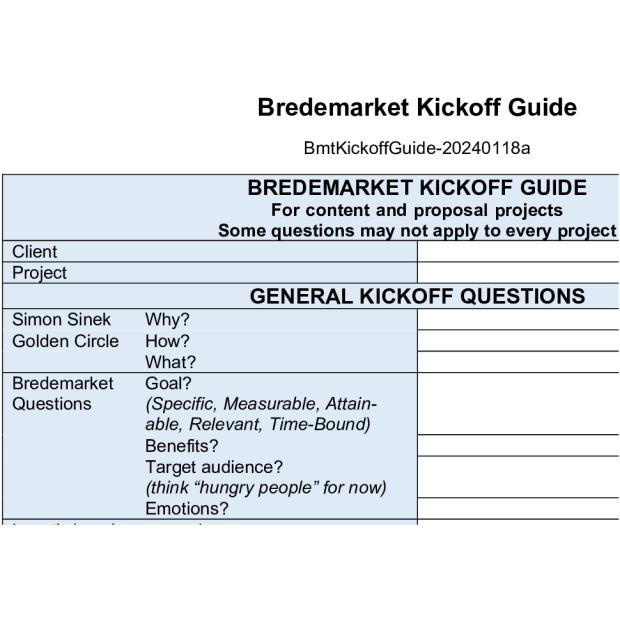
Bredemarket Kickoff Guide header.

  • What is the topic of the content?
  • What is the goal that you want to achieve with the content?
  • What are the benefits (not features, but benefits) that your end customers can realize by using your product or service?
  • What is the target audience for the content?

Once I’ve asked you these and other questions (such as a potential outline), we will both have a good idea of how long the final piece needs to be.

The length of the content also dictates the length and complexity of the review process.

Returning to the content length question

Once we have a good idea of the content length, there are three options that we can pursue to actually create the content.

If your content consists of 400 to 600 words, then I create the content using the process detailed in my Bredemarket 400 Short Writing Service.
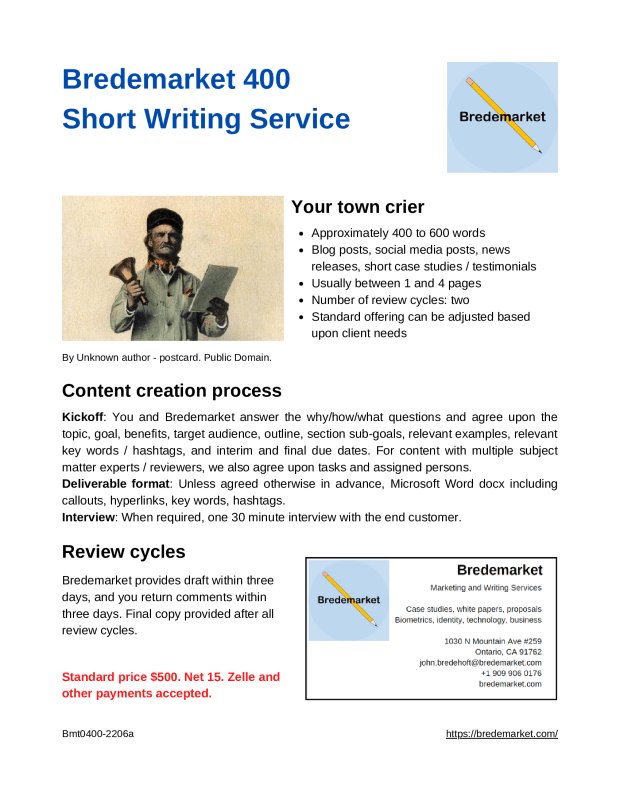
https://bredemarket.com/bredemarket-400-short-writing-service/

This has two review cycles with up to three days per review cycle.

Bredemarket 400 Short Writing Service
If your content is longer, say 2800 to 3200 words, then I create the content using a similar (but more detailed) process through my Bredemarket 2800 Medium Writing Service.

https://bredemarket.com/bredemarket-2800-medium-writing-service/

This has three review cycles with up to seven days per review cycle.

Bredemarket 2800 Medium Writing Service
If your content falls between these two lengths, or is longer than 3200 words, or needs a more rapid delivery time, we’ll talk and come up with a solution. (And we’ll even come up with a spiffy name if you like)
For more services, see https://bredemarket.com/what-i-do/

If you can use my services, what are the next steps?

If I can help your business, or if you have further questions about Bredemarket’s B2B content creation services, please contact me.

And one more thing…

Scroll down to the bottom of my general “local” page for a special “locals only” discount code!

In marketing, move quickly PART TWO: THE OTHERS SPEAK

On March 23, I wrote a post entitled “In marketing, move quickly” (while noting that I didn’t move all that quickly in posting it). After citing stories from a local (unnamed) company, my own time as a product manager, an (again unnamed) international bank, and a (named) car manufacturer, I concluded as follows:

And if you can speed up production of a car, you can speed up production of marketing content and start putting your messaging on your Facebook, LinkedIn, and YouTube accounts, as well as your website immediately so that your customers can get your message.

From https://bredemarket.com/2022/03/23/in-marketing-move-quickly/
By Malene Thyssen – Own work, CC BY-SA 3.0, https://commons.wikimedia.org/w/index.php?curid=10119596

And if you think that the idea of moving quickly in marketing was an idea that I completely originated myself, you REALLY need to get out a bit more.

This post collects a few things that others have said about moving quickly.

Empower your employees (Jim McGinnis of Intuit)

In 2015, Forbes quoted Intuit’s Jim McGinnis, who had previously worked at technology company Activision and non-technology companies Pepsi and Procter & Gamble. He left Intuit in 2017 and has since worked at two other firms, including MyCase.

A more effective strategy to engage your audience is to communicate directly with them often and through multiple touch points. At Intuit, we empower all 8,000 employees to use social media and tweet regularly, but to do so in a smart and effective way that minimizes risk. We do this by instituting principle-based management and guidelines that everybody operates within. We also have a very strong and enduring values-based organization, with the first and most important value being “Integrity without Compromise.”

McGinnis believed that with the Intuit organization, his people were empowered to communicate quickly without waiting for multiple layers of approval (as is required in a “command and control” organization).

And McGinnis’ new company MyCase? One of its marketing messages is the ability to reduce the time spent on weekly billing to 20 minutes.

Excite your customers (Adam Fridman of Mabbly)

That same year (2015), Forbes competitor Inc. ran a piece written by Adam Fridman of Mabbly, a digital marketing agency. Fridman noted that competitors are not the only ones watching how quickly a company moves.

People simply aren’t satisfied with the status quo; they want something more and they want it now. Companies must work quickly to satiate their appetites because audiences will have no qualms about moving to another product or service. 

From https://www.inc.com/adam-fridman/4-reasons-speed-is-everything-in-business.html

Don’t forget your vendors and partners (Isaiah Bollinger of Trellis)

Isaiah Bollinger, co-founder and CEO of Trellis, reiterated the points others made about competitors and customers in a 2018 piece, but he added two other stakeholders.

If you are a slow moving business vendors will (stop) putting effort into the relationship because they can find better customers….

Partners don’t want to work with a slow moving business that can’t innovate. They want fast growing innovators that will bring big impact to their bottom line. 

From https://trellis.co/blog/why-moving-fast-in-business-is-so-important

Incidentally, Bollinger may have moved a little TOO quickly. You see where I inserted the parenthetical comment “(stop)” in the first paragraph above? That’s not what he (or his copywriter) wrote. But we all know what he meant. Check the video.

From https://www.youtube.com/watch?v=M4LViCLtEPU

Conclusion

So there are a number of benefits, and relatively little downside, to moving quickly. And even if you do fail, several of the people quoted above emphasize that you fail quickly, can correct just as quickly, and learn important lessons quickly.

And maybe I’m learning. I didn’t wait two days to post this.

Free resume advice at the Upland (California) library

When I established the Bredemarket Yelp account, I sadly had to inform two inquirers that my services (what I do) did not include resume writing services.

But I just discovered that if you are near Upland, California, you can obtain resume writing services for free.

Today (March 29) and every Tuesday at 4:00 pm, the Upland Library hosts a resume writing workshop, “Resume Runners.” And unlike Bredemarket’s services, Upland Library services are free.

Pangiam/Trueface: when version 1.0 of the SDK is the REVISED version

After a lack of appearances in the Bredemarket blog (none since November), Pangiam is making an appearance again, based on announcements by Biometric Update and Trueface itself about a new revision of the Trueface facial recognition SDK.

The new revision includes a number of features, including a new model for masked faces and some technical improvements.

So what is this revision called?

Version 1.0.

“Wait,” you’re asking yourself. “Version 1.0 is the NEW version? It sounds like the ORIGINAL version. Shouldn’t the new version be 2.0?”

Well, no. The original version was V0. Trueface is now ready to release V1.

Well, almost ready.

If you go to the Trueface SDK reference page, you’ll see that Trueface releases are categorized as “alpha,” “beta,” and “stable.”

  • When I viewed the page on the afternoon of March 28, the latest stable release was 0.33.14634.
  • If you want to use the version 1.0 that is being “introduced” (Pangiam’s word), you have to go to the latest beta release, which was 1.0.16286.
  • And if you want to go bleeding edge alpha, you can get release 1.1.16419.

(Again, this was on the afternoon of March 28, and may change by the time you read this.)

Now most biometric vendors don’t expose this much detail about their software. Some don’t even provide any release information, especially for products with long delivery times where the version that a customer will eventually get doesn’t even have locked-down requirements yet. But Pangiam has chosen to provide this level of detail.

Oh, and Pangiam/Trueface also actively participates in the ongoing NIST FRVT testing. Information on the 1:1 performance of the trueface-003 algorithm can be found here. Information on the 1:N performance of the trueface-000 algorithm can be found here.

Don’t count your bears, and don’t forget them either in Upland

I recently talked about planning for various scenarios, but I didn’t image something like this. Consider the following:

  • Amazon delivery drivers are measured on their ability to deliver packages. Kinda like U.S. Postal Service employees, but Amazon has better measurement tools.
  • Upland, California lies just south of a sparsely inhabited mountain range. Even though the mountain range has semi-desert conditions, the mountains are teeming with wildlife.

Put those two together, and you have this story from Los Angeles’ ABC station.

Yes, that’s an Amazon driver in the foreground, raising his hands to try to scare a bear away so he can make his delivery. He was successful.

The full Storyful video can be found here. (And of course it’s a Ring video. You didn’t expect a Nest video, did you?)

By the way, if your business has a story to tell, Bredemarket can help. (Psst: Upland businesses should scroll to the end of this page for a special “locals only” discount.)

If you would like Bredemarket to help your business tell your story…

Don’t count your chickens, but don’t forget them either

Six eggs.
Don’t count your chickens before they’re hatched. By TudorTulok – Own work, CC BY-SA 4.0, https://commons.wikimedia.org/w/index.php?curid=91343399

A business owner needs to prepare Plan A and Plan B, and usually several other plans besides.

  • What if one part of the business takes off beyond the business owner’s wildest expectations? (“Bredemarket will NEVER have to hire any employees…what, HOW many documents?”)
  • What if that part of the business instead becomes an abandoned haven for crickets?
Seemingly empty paddy field.
By Thamizhpparithi Maari – Own work, CC BY-SA 4.0, https://commons.wikimedia.org/w/index.php?curid=50847636

It’s important that the business remain as flexible as possible to prepare for possible eventualities, or at least the most likely ones. Don’t worry about the unlikely scenarios – for example, I never have to plan for a scenario in which Will Smith slaps someone and cusses the person out on live TV…wait, what’s that?

Planning…and writing

At Bredemarket, I’ve had business spring out of nowhere quickly, and I’ve had business not spring out of nowhere quickly.

  • In one case the time from initial contact to completed work and invoice was less than a day.
  • In other cases it took a little longer; it took me nearly eleven months to land a particular contract.
  • In other cases…I’m still waiting.

But that was the past, and now I face the future. I’ve been thinking about this a lot, especially as I explore various ways to reach my goals for 2022 (including the super-secret unpublished third goal). And I’m wondering how various events could affect these goals…and how the events can affect other events.

  • If event X occurs, how does this affect goal 1 and 3?
  • If event Y occurs, how does this affect goal 1 and 3?
  • If event X and event Y occur, then what happens?

Because I’m a writer, I have to write, and I’ve already started thinking through some of the “what ifs” attached to some of these events, and writing some draft communications that deal with the various events, should they happen.

But I’m leaving them in draft mode.

Because maybe neither event X nor event Y will occur.

But I’ll be ready if event Z occurs two years from now.

Planning…and planning

So how do you plan for events that may or may not occur?

Like any project, you start by taking a step back and examining the potential event at a high level.

And you start questioning, with not only “so what?” questions, but also with repeated “why?” questions (five whys is popular, but it can be any number). If you’ve never seen the five whys in action, watch this video. (H/T Mark Paradies at TapRooT.)

From https://www.youtube.com/watch?v=wdm-23pdS-I

OK, maybe not that video.

But the important thing is to think about a potential event, what it means, and what ramifications emerge from that event if it occurs.

And then proceed accordingly…if the event happens.

The case FOR do not reply email addresses

I’m in the midst of a project. Not a project for Bredemarket clients, but a project for Bredemarket itself. I’m taking a brief break from the project to share some thoughts on “do not reply” email addresses.

Have you ever received an email and noticed that the sender’s email address includes some form of “do not reply”?

In effect, this means that the sender can transmit an email to you, but you cannot transmit an email back to the sender.

By Jacksoncolvett – Own work, CC BY-SA 3.0, https://commons.wikimedia.org/w/index.php?curid=21231033

Because these “do not reply” email addresses are used so often, I figured that there was a good reason to do so. There HAS to be, if so many companies are using them; right?

While searching for good reasons to use “do not reply” email addresses, I instead found a bunch of reasons why you SHOULDN’T use this type of address.

Example articles that explain why NOT to use a “do not reply” email address.

Reasons to use a “do not reply” email address

After modifying my search, however, I found a Zendesk article that listed both the pros and the cons of “do not reply” emails. So there MUST be pros. Finally, a justification for this practice!

Pro: Reduce your team’s workload

From https://www.zendesk.com/blog/reply-emails-pros-cons-best-practices/

That is…it.

After additional searching, I found a ClickZ article that attempted to find some justification for the practice.

To be honest, it’s hard to find a good reason to ever use no-reply emails. There are emails which brands can send which don’t necessarily need a reply, such as:

Transactional emails – emails confirming a purchase, or sending invoice details.

Newsletters. No need to reply, just read the articles.

Marketing emails. Brands obviously want a response here, but not by replying to the email.

The problem with no reply is that, even when no response is needed, it doesn’t look good.

From https://www.clickz.com/should-brands-ever-use-do-not-reply-email-addresses/101887/

And even in the first two instances, I’m sure that ClickZ would agree that while these don’t necessarily need a reply, it would be nice to allow a reply.

  • Maybe after reading that transactional email, someone wants to add to the initial purchase. (You want to receive that reply.)
  • Maybe someone is so excited about a newsletter article that the person wants to respond. (You want to receive that reply.)

So smart people never use “do not reply” email addresses.

Unless they do.

When you use a “do not reply” email address and don’t know it

I recently signed up for a newsletter. I know that this person who writes the newsletter would be happy to engage with her subscribers.

But her newsletter provider doesn’t know this.

When I signed up for the newsletter, the acknowledgement of my subscription came from a “do not reply” email address.

Now I didn’t attribute this faux pas to the person. She may not even know that her tool is so marketing-unfriendly. And there isn’t much she can do about it, other than switch to another subscription tool.

But what am I doing?

But that got me thinking: do my own online properties similarly alienate people?

  • If someone goes to the bottom of this post and subscribes to this blog via email, does WordPress send out a “do not reply” email address?
  • If someone subscribes to the separate Bredemarket mailing list, does Mailchimp send out a “do not reply” email address?

There was only one way to find out: subscribe to these services myself, using one of my alternate email addresses.

Testing WordPress

Test number one was to use email to subscribe to the Bredemarket blog. Most of my subscribers read my posts in the WordPress site or app itself, but there is an email subscription option that a few people use.

Using one of my alternate email addresses, I subscribed to test the process and see if I’m sending out messages with “do not reply” email addresses.

Back at my Bredemarket email address, I received notification of my new subscriber.

Back at the alternate email address, I waited for the promised email with “details of (my) subscription and an unsubscribe link.”

And waited.

And checked my spam folder.

And waited more.

And decided to conduct another test instead. Now that I was subscribed to the Bredemarket blog via email, I composed a test post to see what happened when email subscribers to the Bredemarket blog received test posts.

Now I received an email. While it didn’t provide details of my subscription, it did include an unsubscribe link.

And, most importantly, the email didn’t come from a “do not reply” address, but from the address “comment-reply@wordpress.com.”

Hmm…

So if I reply to this email, will the reply become a comment in the test post?

Actually it did become a comment, once I (putting my Bredemarket hat on again) approved the comment. Scroll to the bottom of the test post to see the comment.

Summary: while I ran into an issue with the subscription confirmation, emails generated by the WordPress email subscription itself do NOT come from a “do not reply” email address. And if you reply to the email, you can post a comment. Very functional two-way communication.

Good. Now for test number two, let’s check Mailchimp.

Testing Mailchimp

This will be a bit harder, because the “empoprises” email address already subscribes to Mailchimp. (I wanted to test out various email formats.) Luckily, I have more than two email addresses.

So I navigated through the Bredemarket website to the Mailchimp subscription page (still need to figure out how to embed that), and subscribed.

I’ve configured my Mailchimp to require a subscription confirmation, and here’s the subscription confirmation I received at my alternate alternate email address.

So if I reply to this message, the reply goes to the Bredemarket email address, not to a “do not reply” black hole.

Summary: emails generated by Mailchimp’s subscription function allow recipients to reply to…me.

One drawback of NOT using a “do not reply” email message

It turns out there’s only one teeny tiny problem with Mailchimp’s implementation, in which all emails appear to come from me.

After my alternate alternate email successfully confirmed a subscription to the Bredemarket mailing list, Mailchimp sent a message from the Bredemarket email address to the Bredemarket email address.

When I received it, there was a big yellow caution.

Be careful with this message

This may be a spoofed message. The message claims to have been sent from your account, but Bredemarket Mail couldn’t verify the actual source. Avoid clicking links or replying with sensitive information, unless you are sure you actually sent this message. (No need to reset your password, the real sender does not actually have access to your account!)

Well, it looked safe to me.

Conclusion

Now I may have forgotten some service somewhere that generates emails on Bredemarket’s behalf, but as far as I know at the moment, none of the Bredemarket properties is guilty of sending out emails with a “do not reply” email address.

Now if we could just eliminate these fake “addresses” on a universal basis. Maybe the EU or California or Illinois can ban them.

When should you target a competitor?

Companies must choose how their marketing will address their competitors. Some choose to ignore the competition, while others publicly target them. And some companies do both simultaneously.

Trellix et al: targeting competitors

Trellix, the company that emerged from the combination of McAfee Enterprise and FireEye, chose the to target its competitors. Trellix’s website contains two pages that target two specific competitors.

  • Trellix vs. CrowdStrike claims that Trellix delivers “earlier, better protection across all phases of the attack chain.” It follows this with a comparison chart that claims security lags.
  • Trellix vs. SentinelOne makes the same claim, but with a different comparison chart that claims a lack of expertise.

For its part, CrowdStrike offers comparisons against both SentinelOne and “McAfee,” while SentinelOne offers comparisons against both CrowdStrike and “McAfee.” Apparently these firms need to update their pages to reflect the new company name (and possibly new features) of Trellix.

Obviously the endpoint protection industry demands these types of comparisons to sway buyers to choose one product over another.

Apple: targeting industry leaders (and ignoring other competitors)

But competitor targeting is also used by upcoming firms to displace established ones. I’ve previously talked about (then) Apple Computer’s famous “Welcome, IBM. Seriously” ad “welcoming” IBM to the personal computer industry. This was part of Steve Jobs’ multi-year effort to grow Apple by targeting and displacing IBM. But while IBM was the clear target, Apple also targeted everyone else, as Bill Murphy, Jr. noted:

Added benefit: There were actually other personal computer companies that were just as successful as Apple at the time, like Commodore, Tandy, and Osborne. The Apple ad ignored them.

From https://www.inc.com/bill-murphy-jr/37-years-ago-steve-jobs-ran-apples-most-amazing-ad-heres-story-its-almost-been-forgotten.html

By framing the circa 1981 computer industry as a battle between the Apple and IBM, Jobs captured the world’s attention. Not only by positioning Apple as David in a battle against Goliath, but by positioning Apple as one of only two companies that mattered. This marketing would reach its peak three years later, in 1984.

From https://www.youtube.com/watch?v=R706isyDrqI

When the targeter becomes the target

After 1984, the computer world changed dramatically (as it always does), with other companies creating what were then called “clones,” as well as the massive changes at both IBM and “Apple Computer” (now Apple).

Eventually, small spunky outfits challenged Apple itself, with Fortnite in particular targeting Apple’s requirement that Fortnite exclusively use Apple payments.

From https://www.youtube.com/watch?v=fHLuKumkASg

So when should you target competitors?

The decision on whether or not to publicly acknowledge and target competitors varies depending upon a company’s culture and its market position.

  • As seen above, some markets such as the endpoint protection market demand competitor comparisons. Others (Apple 1981-1984, Fortnite 2020) target competitors to buttress their own positions. And don’t forget how Avis targeted Hertz in 1962, and Hertz subsequently responded.
  • Then again, sometimes it’s best to not acknowledge the competition. Again note that Apple only acknowledged one competitor in the early 1980s, refusing to acknowledge that the other competitors even existed.
  • In some cases, companies don’t acknowledge the competition because they don’t believe they measure up to the competition on benefits, features, or even price. For these companies, their challenge is to identify some advantage over the competition and promote that advantage, even if the relevant competitors are not explicitly mentioned.