Biometric Product Marketers, BIPA Remains Unaltered

(Part of the biometric product marketing expert series)

You may remember the May hoopla regarding amendments to Illinois’ Biometric Information Privacy Act (BIPA). These amendments do not eliminate the long-standing law, but lessen its damage to offending companies.

Back on May 29, Fox Rothschild explained the timeline:

The General Assembly is expected to send the bill to Illinois Governor JB Pritzker within 30 days. Gov. Pritzker will then have 60 days to sign it into law. It will be immediately effective.

According to the Illinois General Assembly website, the Senate sent the bill to the Governor on June 14.

While the BIPA amendment has passed the Illinois House and Senate and was sent to the Governor, there is no indication that he has signed the bill into law within the 60-day timeframe.

So BIPA 1.0 is still in effect.

As Photomyne found out:

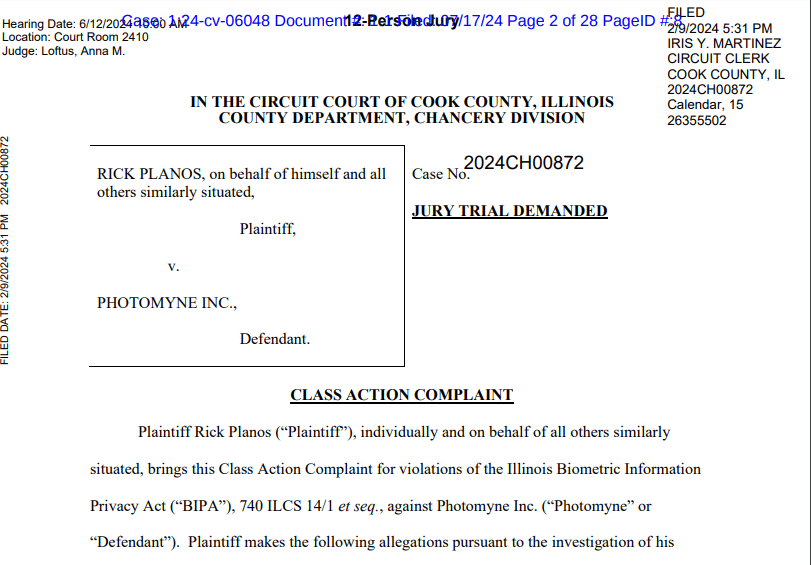
A proposed class action claims Photomyne, the developer of several photo-editing apps, has violated an Illinois privacy law by collecting, storing and using residents’ facial scans without authorization….

The lawsuit contends that the app developer has breached the BIPA’s clear requirements by failing to notify Illinois users of its biometric data collection practices and inform them how long and for what purpose the information will be stored and used.

In addition, the suit claims the company has unlawfully failed to establish public guidelines that detail its data retention and destruction policies.

From https://www.instagram.com/p/C7ZWA9NxUur/.

A Few Thoughts on FedRAMP

The 438 U.S. federal agencies (as of today) probably have over 439 different security requirements. When you add state and local agencies to the list, security compliance becomes a mind-numbing exercise.

  • For example, the U.S. Federal Bureau of Investigation has its Criminal Justice Information Systems Security Policy (version 5.9 is here). This not only applies to the FBI, but to any government agency or private organization that interfaces to the relevant FBI systems.
  • Similarly, the U.S. Department of Health and Human Services has its Health Insurance Portability and Accountability Act (HIPAA) Security Rule. Again, this also applies to private organizations.

But I don’t care about those. (Actually I do, but for the next few minutes I don’t.) Instead, let’s talk FedRAMP.

Why do we have FedRAMP?

The two standards that I mentioned above apply to particular government agencies. Sometimes, however, the federal government attempts to create a standard that applies to ALL federal agencies (and other relevant bodies). You can say that Login.gov is an example of this, although a certain company (I won’t name the company, but it likes to ID me) repeatedly emphasizes that Login.gov is not IAL2 compliant.

But forget about that. Let’s concentrate on FedRAMP.

Why do we have FedRAMP?

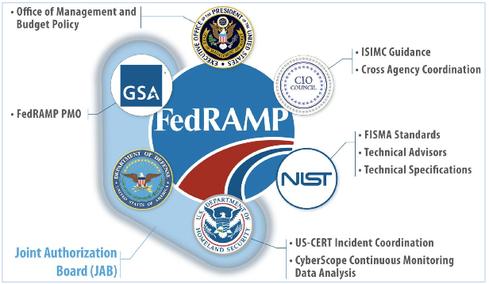
The Federal Risk and Authorization Management Program (FedRAMP®) was established in 2011 to provide a cost-effective, risk-based approach for the adoption and use of cloud services by the federal government. FedRAMP empowers agencies to use modern cloud technologies, with an emphasis on security and protection of federal information. In December 2022, the FedRAMP Authorization Act was signed as part of the FY23 National Defense Authorization Act (NDAA). The Act codifies the FedRAMP program as the authoritative standardized approach to security assessment and authorization for cloud computing products and services that process unclassified federal information.

From https://www.fedramp.gov/program-basics/.

Note the critical word “unclassified.” So FedRAMP doesn’t cover EVERYTHING. But it does cover enough to allow federal agencies to move away from huge on-premise server rooms and enjoy the same SaaS advantages that private entities enjoy.

Today, government agencies can now consult a FedRAMP Marketplace that lists FedRAMP offerings the agencies can use for their cloud implementations.

A FedRAMP authorized product example

When I helped MorphoTrak propose its first cloud-based automated biometric identification solutions, our first customers were state and local agencies. To propose those first solutions, MorphoTrak partnered with Microsoft and used its Azure Government cloud. While those first implementations were not federal and did not require FedRAMP authorization, MorphoTrak’s successor IDEMIA clearly has an interest in providing federal non-classified cloud solutions.

When IDEMIA proposes federal solutions that require cloud storage, it can choose to use Microsoft Azure Government, which is now FedRAMP authorized.

It turns out that a number of other FedRAMP-authorized products are partially dependent upon Microsoft Azure Government’s FedRAMP authorization, so continued maintenance of this authorization is essential to Microsoft, a number of other vendors, and all the agencies that require secure cloud solutions.

They can only hope that the GSA Inspector General doesn’t find fault with THEM.

Is FedRAMP compliance worth it?

But assuming that doesn’t happen, is it worthwhile for vendors to pursue FedRAMP compliance?

If you are a company with a cloud service, there are likely quite a few questions you are asking yourself about your pursuits in the Federal market. When will the upward trajectory of cloud adoption begin? What agency will be the next to migrate to the cloud? What technologies will be migrated? As you move forward with your business development strategy you will also question whether FedRAMP compliance is something you should pursue?

The answer to the last question is simple: Yes. If you want the Federal Government to purchase your cloud service offering you will, sooner or later, have to successfully navigate the FedRAMP process.

From https://www.mindpointgroup.com/blog/fedramp-compliance-is-it-worth-it.

And a lot of companies are doing just that. But with less than 400 FedRAMP authorized services, there’s obviously room for growth.

Bredemarket’s Name for the Sixth Factor of Authentication

Depending upon whom you ask, there are either three or five factors of authentication.

Unless you ask me.

I say that there are six.

Let me explain.

First I’ll discuss what factors of authentication are, then I’ll talk about the three factor and five factor school, then I’ll briefly review my thoughts on the sixth factor—now that I know what I’ll call it.

What are factors of authentication?

Before proceeding to factors of authentication, let’s review TechTarget’s definition of authentication.

Authentication is the process of determining whether someone or something is, in fact, who or what it says it is.

From https://www.techtarget.com/searchsecurity/definition/authentication

For purposes of this post I’m going to stay away from the “something” part and concentrate on the “someone” part.

For example, if Warren Buffett has a bank account, and I claim that I am Warren Buffett and am entitled to take money from that bank account, I must complete an authentication process to determine whether I am entitled to Warren Buffett’s money. (Spoiler alert: I’m not.)

So how do I authenticate? There are many different ways to authenticate, which can be grouped into several authentication factors. Here’s how Sumo Logic defines “authentication factor.”

An authentication factor is a special category of security credential that is used to verify the identity and authorization of a user attempting to gain access, send communications, or request data from a secured network, system or application….Each authentication factor represents a category of security controls of the same type. 

From https://www.sumologic.com/glossary/authentication-factor/

When considering authentication factors, the whole group/category/type definition is important. For example, while a certain system may require both a 12-character password and a 4-digit personal identification number (PIN), these are pretty much the same type of authentication. It’s just that the password is longer than the PIN. From a security perspective, you don’t gain a lot by requiring both a password and a PIN. You would gain more by choosing a type of authentication that is substantially different from passwords and PIN.

How many factors of authentication are there?

So how do we define the factors of authentication? Different people have different definitions.

Three factors of authentication

For the most part, I believe that everyone agrees on at least three factors of authentication. As I noted in a prior post on factors of authentication, NIST defines the following three factors:

Factors include: (i) something you know (e.g. password/personal identification number (PIN)); (ii) something you have (e.g., cryptographic identification device, token); or (iii) something you are (e.g., biometric).

From https://csrc.nist.gov/glossary/term/Multi_Factor_Authentication, cited in https://bredemarket.com/2022/03/19/remember-the-newer-factors-of-authentication/

Note that NIST’s three factors are very different from one another. Knowing something (such as a password or a PIN) differs from having something (such as a driver’s license) or being something (a fingerprint or a face).

But some people believe that there are more than three factors of authentication.

Five factors of authentication

Let’s add two factors to the definition trumpeted by NIST. People such as The Cybersecurity Man have included all five in their definition.

  • Something you know.
  • Something you have.
  • Something you are.
  • Something you do.
  • Somewhere you are.

For more information, see my March 2021 post on the five factors of authentication.

But are there only five?

Six factors of authentication

In April 2022, I began wondering if there is a sixth authentication factor. While I struggled to put it into the “some xxx you xxx” format, I was able to encapsulate what this sixth factor was.

What about the authentication factor “why”?

This proposed factor, separate from the other factors, applies a test of intent or reasonableness to any identification request.

From https://bredemarket.com/2022/04/12/the-sixth-factor-of-multi-factor-authentication-you-heard-it-here-first/
Why is this man smoking a cigarette outdoors? By Marek Slusarczyk, CC BY 3.0, https://commons.wikimedia.org/w/index.php?curid=108924712

Over the months, I struggled through some examples of the “why” factor.

  • Why is a person using a credit card at a McDonald’s in Atlantic City? (Link) Or, was the credit card stolen, or was it being used legitimately?
  • Why is a person boarding a bus? (Link) Or, was the bus pass stolen, or was it being used legitimately?
  • Why is a person standing outside a corporate office with a laptop and monitor? (Link) Or, is there a legitimate reason for an ex-employee to gain access to the corporate office?

As I refined my thinking, I came to the conclusion that “why” is a reasonable factor of authentication, and that this was separate from the other authentication factors (such as “something you do”).

And the sixth factor of authentication is called…

You’ll recall that I wanted to cast this sixth authentication factor into the “some xxx you xxx” format.

So, as of today, here is the official Bredemarket list of the six factors of authentication:

  • Something you know.
  • Something you have.
  • Something you are.
  • Something you do.
  • Somewhere you are.

(Drumroll…)

  • Somewhat you why.

Yes, the name of this factor stands out from the others like a sore thumb (probably a loop).

However, the performance of this factor stands out from the others. If we can develop algorithms that accurately measure the “why” reasonableness of something as a way to authenticate identity, then our authentication capabilities will become much more powerful.

The sixth factor of multi factor authentication (you heard it here first!)

As many of my readers know, there are a variety of ways for people to individually identify themselves.

The National Institute of Standards and Technology recognizes three of these authentication factors:

  • The most commonly known authentication factor is “something you know.” This includes such items as passwords, personal identification numbers (PINs), and the name of your childhood pet. This authentication factor is very common and very controversial, to the point where some want to eliminate it altogether. (I don’t.)
  • Another authentication factor that I know very well is “something you are.” Biometrics such as fingerprint identification and facial recognition falls into this category, as well as gait recognition, “behavioral biometrics,” and other biometric identifiers.
  • The third authentication factor that NIST recognizes is “something you have.” This could be a driver’s license, a passport, a key fob, a smartphone, or perhaps a digital identity application.

But those aren’t the only authentication factors. Two others have been identified, as I have previously noted.

  • “Something you do” differs from both gait recognition and behavioral biometrics, because this is not an inherent property of your being, but is a deliberate set of actions on your part. For example, you could gain access to a nuclear facility by putting your left foot in, putting your left foot out, putting your left foot, in and shaking it all about. Note, however, that this particular “something you do” is as common as the password “12345” and should be avoided.
  • And the fifth factor is “somewhere you are.” For example, if I am buying something at a a store in Virginia, but I am physically in California, something appears to be wrong.
GPS network illustration
By Éric Chassaing – Own work, CC BY-SA 3.0, https://commons.wikimedia.org/w/index.php?curid=8876959

OK, that’s it. End of post. Those are the five authentication factors. There aren’t any more, and there never will be any more. Oh sure, you could come up with a sixth authentication factor, but chances are that it would map into one of the five existing authentication factors.

Or maybe not.

Why?

I’d like to propose a sixth authentication factor.

What about the authentication factor “why”?

This proposed factor, separate from the other factors, applies a test of intent or reasonableness to any identification request.

Man smoking a cigarette and stacking hats on a fire hydrant
Why is this man smoking a cigarette outdoors? By Marek Slusarczyk, CC BY 3.0, https://commons.wikimedia.org/w/index.php?curid=108924712

Let me give you an example. Assume for the moment that I am at a McDonald’s in Atlantic City and want to use my brand new credit card to buy some healthy Irish cuisine.

McDonald's food
Not in Atlantic City. By TeaLaiumens – Own work, CC BY-SA 4.0, https://commons.wikimedia.org/w/index.php?curid=37026979

You could, of course, apply the existing authentication factors to this transaction:

  • I physically have the credit card.
  • I know the PIN that is associated with the credit card.
  • My face matches the face of the person who owns the credit card.
  • I am physically at the McDonald’s where the food is for sale, and I physically have a hotel key associated with a nearby hotel, and I physically have a badge associated with a trade show in the city. (The latter two facts are actually a combination of “something you have” and “somewhere you are,” but I threw them here for the fun of it.)
  • If my credit card company has implemented it, I can perform the super secret finger pattern (or hokey pokey dance) associated with this account.

But even if all of these factors are authenticated, or even if some of them are not, does it make sense that I would be purchasing a meal at a McDonald’s in Atlantic City?

  • Did I recently book a flight and fly from my California home to Atlantic City? This could explain “why” I was there.
  • Is it lunchtime? This could explain “why” I was making this transaction.
  • Is my stomach growling? This could indicate that I am hungry, and could explain “why” I was at such a fine food establishment.

Admittedly, employing data warehousing and artificial intelligence to use the “why” factor to authenticate a small fast food purchase is overkill, just like it’s overkill to require three biometric identifiers and a passport to open a physical mailbox.

But perhaps use of such an authentication factor would be appropriate at a critical infrastructure facility such as a nuclear power plant.

nuclear power plant
By Avda – Own work, CC BY-SA 3.0, https://commons.wikimedia.org/w/index.php?curid=26894741

Assume for the moment that I am a double agent, employed the the U.S. Department of Energy but secretly a spy for an enemy country. All of the five authentication factors check out, and I am the person who is authorized to visit a particular nuclear power plant.

But why am I there?

Am I there for some regular U.S. Department of Energy business that is totally above board?

Or am I there for some other unknown reason, such as theft of secrets or even sabotage?

How to implement the “why?” authentication factor

I believe that a “why?” authentication factor could be very powerful, but it would take some effort to implement it.

First, the authentication system would have to access all the relevant data. In the McDonald’s example above, that includes (a) my flight data, (b) the time of day, and (c) my health data (“biometrics” in the broader sense). In the nuclear power plant example, the authentication system would have to know things such as nuclear power plant inspection schedules, trip authorizations from my supervisor, and other data that would indicate a reason for me to be at the plant. That’s a lot of data.

Neural network
By en:User:Cburnett – This W3C-unspecified vector image was created with Inkscape ., CC BY-SA 3.0, https://commons.wikimedia.org/w/index.php?curid=1496812

Second, the authentication system would have to process all the relevant data to glean knowledge from it. By itself, the data points “United Flight 123 from Ontario to Atlantic City yesterday,” “1:30 pm,” and “haven’t eaten in six hours” do not allow the system to make an authentication decision.

Third, the authentication system would have to collect and protect that mass of data in a way that protects my privacy and the privacy of others. In the United States at present, this is where the whole system would probably fall apart. While a whole bunch of data is collected about us and placed in silos (the TSA-airline silo, for example), putting it all together could be pretty scary to some. Although certain lawyers in Illinois would love the moneymaking opportunities that such a system could provide via Illinois Biometric Information Privacy Act lawsuits.

So a complete implementation of the “why” authentication factor is probably impossible for now, due to both technical and societal constraints.

But is it possible to implement a subset of the “why” authentication factor? For example, since a company presumably has access to employee corporate travel schedules, could the company use the knowledge of an employee’s flight from Chicago to Los Angeles on Sunday to provide the employee with physical access to the firm’s Southern California office on Monday?

Something to think about.

Maybe I should speak to a patent attorney.

Update on Covishield and the EUDCC, as long as you can prove you were born

It’s been a while since I looked at issues regarding the European Union Digital COVID Certificate (EUDCC).

And there are a ton of ramifications and unintended consequences.

Covishield and the EUDCC

When I last looked at the EUDCC, I examined its effect on travel from people outside of the European Union. The question at the time was what would happen to people who were vaccinated with something other than the European Medicines Agency-approved vaccines, thus rendering them ineligible for the EUDCC.

In particular, people who were vaccinated with the Covishield vaccine were not eligible for the EUDCC. Depending upon whom you asked, Covishield is either just the same as the EMA-approved AstraZeneca vaccine (now referred to as “Vaxzervria” in EU-speak), or it has a radically different manufacturing process that disqualifies it from automatic acceptance.

This non-recognition of Covishield has a great impact on African nations, because that vaccine is popular there. However, EUDCC disapproval has been offset by the actions of several individual countries to recognize Covishield as a vaccine. For example, Greece recognizes ten vaccines (including Covishield) as opposed to the EU’s four. Of course, you have to go through additional paperwork to get authorization to enter a specific country.

But Joseph Atick notes that there’s another issue that adversely impacts the ability of Africans to enter Europe.

Linking a vaccination to a person

Assume for the moment that you have received an EU-authorized vaccine. This is only part of the battle, because the act of vaccination has to be tied to you as a person.

Dr. Joseph Atick of ID4Africa. From https://id4africa.com/the-general-secretariat/

And Atick notes one complicating factor in making that link:

One of the biggest barriers to setting up these systems—and one that could greatly complicate digital health certificates – involves traceability, which for an official digital ID means documenting one’s birth event.

In Africa, not everyone has a birth certificate, and many struggle to trace their identity to the birth event.

If you cannot prove to the satisfaction of the European Union (or whoever) that you were the actual person who received a vaccine, then you may face barriers to entering Europe (or wherever).

And what are the ramifications of this?

A digital health certificate has appeal as an efficient and effective way to manage COVID-19 risks. But if we don’t pause now to consider the implications of getting it wrong and look for ways to get it right, these marvellous digital innovations could also be supremely effective at creating a binary world of those who can prove their COVID-19 risk status and those who cannot.

The requirement for a digital identity

Oh, and there’s another issue that Atick didn’t address, but which bears noting.

All of the health vaccination solutions listed above assume as a given that people will be the owners of a unique, government-authorized digital identity.

As I’ve noted elsewhere, there are people who are fervently opposed to this.

In my country, both some people on the left and some people on the right believe that “governmental digital identity” naturally equates to “governmental digital surveillance,” and that governments shouldn’t be abusing the data that they can obtain from all the vaccinations you get, all the places you travel, all the things you buy, and all the other things that you do.

(Well, except for voting. Some on the right fervently believe that government identities are essential to voting, even if they’re not essential to any other activity.)

But are people truly banned from travel?

So where does this leave the people who cannot prove that they were vaccinated with an authorized vaccine, or perhaps were never vaccinated at all?

In many cases travel for the unvaccinated is not banned, but they have to go through additional hoops to travel. Using one example, unvaccinated U.S. citizens can travel to Austria if they “have recovered from COVID-19 in the past 180 days; or present a negative COVID-19 PCR or antigen test result procured within 72 or 48 hours of travel.” For more country-by-country specifics as of August 13, click here.

But how will the unvaccinated get to Europe, or anywhere else?

But on the other hand, a vaccination in and of itself is not a guarantee that you can travel. Norway has a long list of requirements that an incoming person must satisfy, vaccination or not. This isn’t the time for an American to go on a sightseeing tour to Oslo.

Or Pyongyang.

So a binary division into the “travels” and “travel nots” may not become a reality. Instead, it will be a gradation of travel allowances and non-allowances, based upon a variety of factors.

In this post, “NGI” stands for Non-Governmental Identity

I admit to my biases.

As a former long-time employee of a company that provides finger and face technology for the Federal Bureau of Investigation’s Next Generation Identification (NGI) system, as well as driver’s license and passport technology in the United States and other countries, I am reflexively accustomed to thinking of a proven identity in governmental terms.

Because the government is always here to help.

From World War II. By Packer, poster artist, Artist (NARA record: 8467744) – U.S. National Archives and Records Administration, Public Domain, https://commons.wikimedia.org/w/index.php?curid=16929857

What this means in practice is that whenever I see a discussion of a proven identity, I reflexively assume that the identity was proven through means of some type of governmental action.

  • Perhaps the identity was tied to a driver’s license identity maintained by a state agency (and checked against other states via AAMVA’s “State to State” to ensure that there are no duplicate identities).
  • Or perhaps the identity was proven via the use of a database maintained by a government agency, such as the aforementioned NGI or perhaps a database such as the CODIS DNA database.

However, I constantly have to remind myself that not everyone thinks as I do, and that for some people an identity proven by governmental means is the worst possible scenario.

Use of DNA for humanitarian efforts

Take an example that I recently tweeted about.

I recently read an article from Thermo Fisher Scientific, which among other things provides a slew of DNA instruments, software, and services for both traditional DNA and rapid DNA.

One of the applications of DNA is to prove family relationships for migrants, especially after families were separated after border crossings. This can be done in a positive sense (to prove that a separated parent and child ARE related) or in a negative sense (to prove that a claimed parent and child are NOT related). However, as was noted in a webinar I once attended, DNA is unable to provide any verification of legitimate adoptions.

By Nofx221984 – Own work, Public Domain, https://commons.wikimedia.org/w/index.php?curid=7429871

Regardless of the purpose of using DNA for migrants, there is a certain level of distrust among the migrants when the government says (presumably in Spanish), “We’re the government. We’re here to help.” You don’t have to be a rabid conspiracy theorist to realize that once DNA data is captured, there is no technical way to prevent the data from being shared with every other government agency. Certain agencies can establish business rules to prevent such sharing, but those business rules can include wide exceptions or the rules can be ignored entirely.

Therefore, Thermo Fisher Scientific decided to discuss humanitarian DNA databases.

As a result of migration, human trafficking and war, humanitarian databases are a relatively new concept and are often completely separate from criminal databases. Research has shown that family members may distrust government databases and be reluctant to report the missing and provide reference samples (1). Humanitarian databases are repositories of DNA profiles from reported missing persons, relative reference samples, and unknown human remains and may be managed by non-governmental organizations (NGOs), though in some instances they may be managed by a governmental institution but kept separate from criminal databases. Examples of humanitarian databases can be found in the United States (NamUsUniversity of North Texas HDID), Canada (Royal Canadian Mounted Police), Australia (National DNA Program for unidentified and missing persons) and internationally via the International Commission on Missing Persons (ICMP).

As you can see from the list, some of these databases ARE managed by government police agencies such as the RCMP. But others are not. The hope, of course, is that migrants would be willing to approach the humanitarian folks precisely BECAUSE they are not the police. Reluctance to approach ANY agency may be dampened by a desire to be reunited with a missing child.

And these non-governmental efforts can work. The Colibri Center claims to have performed 142 identifications that would not have been made otherwise.

Reluctance to set national standards for mobile driver’s licenses

Because of my (biased) outlook, mobile driver’s licenses and other applications of government-proven digital identity seem like a wonderful thing. The example that I often bore you with is the example of buying a drink at a bar. If someone does this with a traditional driver’s license, the bartender not only learns the drinker’s birthdate, but also his/her address, (claimed) height and weight, and other material irrelevant to the “can the person buy a drink?” question. With a mobile driver’s license, the bartender doesn’t even learn the person’s birthdate; the bartender only learns the one important fact that the drinker is over 21 years of age.

Some people are not especially wowed with this use case.

The DHS Request for Comment has finally closed, and among the submissions is a joint response from the American Civil Liberties Union, Electronic Frontier Foundation (EFF), & Electronic Privacy Information Center (EPIC). The joint response not only warns about potential misuse of government digital identities, but also questions the rush of establishing them in the first place.

We believe that it is premature to adopt industry standards at this time as no set of standards has been completed that fully takes advantage of existing privacy-preserving techniques. In recent decades we have seen the emergence of an entire identity community that has been working on the problems of online identity and authorization. Some within the identity community have embraced centralized and/or proprietary systems…

You can imagine how the ACLU, EFF, and EPIC feel about required government-managed digital identities.

Is a Non-Governmental Identity (NGI) feasible and reliable?

Let’s return to the ACLU/EFF/EPIC response to the DHS Request for Comment, which mentions an alternative to centralized, proprietary maintenance of digital identities. This is the alternative that I’m referring to as NGI just to cause MAC (massive acronym confusion).

…others are animated by a vision of “self-sovereign
identity” that is decentralized, open source, privacy-preserving, and empowering of individuals. That movement has created a number of proposed systems, including an open standard created by the World Wide Web Consortium (W3C) called Verifiable Credentials (VCs)….

DHS should refuse to recognize IDs presented within centralized identity systems. If a standard digital identity system is to be accepted by the federal government, it must be created in an open, transparent manner, with the input of multiple stakeholders, and based upon the self-sovereign identity concept. Such a system can then be used by federal government agencies to view identity credentials issued by state departments of motor vehicles (DMVs) where doing so makes sense. If standards based on self-sovereign identity are not considered mature enough for adoption, efforts should be directed at rectifying that rather than at adopting other systems that raise privacy, security, and autonomy risks.

For all practical purposes, the chances of the ACLU/EFF/EPIC convincing the Department of Homeland Security to reject government-proven identities are approximately zero. And since DHS controls airport access, you probably won’t see an airport security agent asking for your Verifiable Credentials any time soon. Self sovereign identities are just as attractive to government officials as sovereign citizens.

Who issues Verifiable Credentials?

As ACLU/EFF/EPIC noted, Verifiable Credentials are still under development, just as the centralized system standards are still under development. But enough advances have been made so that we have somewhat of an idea what they will look like. As Evernym notes, there is a trusted triangle of major players in the Verifiable Credentials ecosystem:

There are a number of directions in which we can go here, but for the moment I’m going to concentrate on the Issuer.

In the current centralized model being pursued in the United States, the issuers are state driver’s license agencies that have “voluntarily” consented to agree to REAL ID requirements. Several states have issued digital versions of their driver’s licenses which are recognized for various purposes at the state level, but are not yet recognized at the federal level. (The purpose of the DHS Request for Comment was to solicit thoughts on federal adoption of digital identities. Or, in the case of some respondents, federal NON-adoption of digital identities.)

Note that in the Verified Credentials model, the Issuer can be ANYBODY who has the need to issue some type of credential. Microsoft describes an example in which an educational institution is an Issuer that represents that a student completed particular courses.

Without going into detail, the triangle of trust between Issuers, Verifiers, and Holders is intended to ensure that a person is who they say they are. And to the delight of the ACLU et al, this is performed via Decentralized Identifiers (DIDs), rather than by centralized management by the FBI or the CIA, the BBC, B. B. King, Doris Day, or Matt Busby. (Dig it.)

But NGIs are not a cure-all

Despite the fact that they are not controlled by governments, and despite that fact that users (at least theoretically) control their own identities, no one should think that digital identities are the solution to all world problems…even when magic paradigm-shifting words like “blockchain” and “passwordless” are attached to them.

Here’s what McKinsey has said:

…even when digital ID is used with good intent, risks of two sorts must be addressed. First, digital ID is inherently exposed to risks already present in other digital technologies with large-scale population-level usage. Indeed, the connectivity and information sharing that create the value of digital ID also contribute to potential dangers. Whether it is data breaches and cyber-intrusions, failure of technical systems, or concerns over the control and misuse of personal data, policy makers around the world today are grappling with a host of potential new dangers related to the digital ecosystem.

Second, some risks associated with conventional ID programs also pertain in some measure to digital ID. They include human execution error, unauthorized credential use, and the exclusion of individuals. In addition, some risks associated with conventional IDs may manifest in new ways as individuals newly use digital interfaces. Digital ID could meaningfully reduce many such risks by minimizing opportunity for manual error or breaches of conduct.

In addition, many of these digital identity initiatives are being pursued by large firms such as IBM and Microsoft. While one hopes that these systems will be interoperable, there is always the danger that the separate digital identity systems from major firms such as IBM and Microsoft may NOT be interoperable, in the same way that the FBI and DHS biometric systems could NOT talk to each other for several years AFTER 9/11.

And it’s not only the large companies that are playing in the market. Shortly after I started writing this post, I ran across this LinkedIn article from the Chief Marketing Officer at 1Kosmos. The CMO makes this statement in passing:

At 1Kosmos, we’ve taken our FIDO2 certified platform one step further with a distributed identity based on W3C DID standards. This removes central administration of the database via a distributed ledger for true “privacy by design,” putting users in sole access and control of their identity.

1Kosmos, IBM, and Microsoft know what they’re talking about here. But sadly, some people only think these technologies are “cool” because they’re perceived as anti-government and anti-establishment. (As if these companies are going to call for the downfall of capitalism.)

Which identiy(ies) will prevail?

Back to governmental recognition of NGI.

Don’t count on it.

Anticipated DHS endorsement of government-issued digital identities doesn’t mean that NGI is dead forever, since private companies can adopt (and have adopted) any identity system that they wish.

So in truth we will probably end up with a number of digital identities like we have today (I, for example, have my WordPress identities, my Google identities, and countless others). The difference, of course, is that the new identities will be considered robust – or won’t be, when centralized identity proponents denigrate decentralized identities and vice versa.

But frankly, I’m still not sure that I want Facebook to know how much I weigh.

(Although, now that I think about it, Apple already knows.)

Are unified digital IDs a thing?

I’ve been busy helping a client who needed summer fill-in help, but I’m finally making the time to catch up on my reading. And this article from Government Technology was on my reading list.

When I read the title “Mobile Driver’s Licenses Pave the Way for Unified Digital IDs,” I was intrigued by the last three words. I mean, there are more and more states releasing (non-pilot) mobile driver’s licenses, and the standard is coming along, and work is being done to prepare for federal acceptance.

But what about the “unified” part? How did David Raths address that?

Government uses of digital ID

Well, he listened to Eric Jorgensen, director of Arizona’s Department of Transportation.

“I actually hate the term ‘mDL’ because it doesn’t recognize the power of what we’re doing here….The whole concept is that we’re providing a way to remotely authenticate a person, to provide a trusted digital identity that doesn’t exist today. Once we provide that, we’re opening doors to enhanced government services. Also, the government can play a key role in facilitating commerce, providing a better citizen experience and providing for the security of that citizen — that goes way beyond what a driver’s license is about.”

Although all that Jorgensen is discussing is providing a trusted digital identity that is equivalent to a trusted physical identity. If you have to show your driver’s license when visiting a government office’s physical location, conceivably you can show your digital driver’s license when visiting a government office’s website.

Enterprise uses of digital ID

And there are applications beyond government. Delaware and other states are persuading private businesses to accept mobile driver’s licenses as valid forms of identification. There’s a powerful use case for age-restricted products, of course; since all that an alcohol-selling business needs to know is whether you are over the age of 21, the mobile driver’s license ONLY shows that you are over the age of 21. It doesn’t show your address, your weight, or even your birthdate.

But what about a true UNIFIED digital ID?

However, I semantically question whether this is truly a “unified” ID. This is just digitization of an existing government-endorsed ID. A “unified” ID would be one that would not only let me drive, vote, and buy alcohol, but would also serve as my ID to log into Facebook or buy Bitcoin. (Yes, I realize that use of a government ID to buy Bitcoin violates the space-time continuum in some way.)

And for that to happen, work may need to be done to make mobile IDs compatible with existing authentication/authorization methods such as OAuth and OpenID Connect.

And the whole “but what if I don’t have a digital ID?” question must be addressed.

And the whole “but what if I want to use a self-sovereign ID that is NOT government endorsed?” question must be addressed.

And presumably a myriad of other questions would need to be addressed also.

But for me, I can’t address unified digital IDs today. Just got a message from my summer-challenged client…