AdvoLogix on “9 Ways to Use AI in the Workplace”

Bredemarket occasionally gets pitches from people who want to write for the blog, or to link to something they’ve already written.

Most of these pitches are crap.

But I just received an excellent and relevant pitch from a PR coordinator. I won’t reproduce his pitch, though, because I don’t want to get sued.

Which in this case is a very distinct possibility.

Who is AdvoLogix?

The PR coordinator represents a company called AdvoLogix, and wanted me to reshare something his company had written.

My first question (of course) is why AdvoLogix exists.

We build and deliver technologies that help legal teams collaborate and grow.

From https://www.advologix.com/about-advologix/

The company provides legal software, resident on Salesforce, that addresses several areas:

Now I am not a lawyer, but I’m sure these terms mean something to lawyers. If you’re looking for these types of solutions, check the links above.

Why did AdvoLogix pitch me?

The PR coordinator had observed Bredemarket’s previous posts on artificial intelligence (excluding the one that I wrote after his pitch), and thought that AdvoLogix’s recent blog post on the same topic would be of interest to Bredemarket’s readers.

What does AdvoLogix say about using AI in the workplace?

AdvoLogix’s post is clear in its intent. It is entitled “9 Ways to Use AI in the Workplace.” The introduction to the post explains AdvoLogix’s position on the use of artificial intelligence.

Rather than replacing human professionals, AI applications take a complementary role in the workplace and improve overall efficiency. Here are nine actionable ways to use artificial intelligence, no matter your industry.

From https://www.advologix.com/ai-applications-business/

I won’t list ALL nine of the ways—I want you to go read the post, after all. But let me highlight one of them—not the first one, but the eighth one.

Individual entrepreneurs can also benefit from AI-driven technologies. Entrepreneurship requires great financial and personal risk, especially when starting a new business. Entrepreneurs must often invest in essential resources and engage with potential customers to build a brand from scratch. With AI tools, entrepreneurs can greatly limit risk by improving their organization and efficiency. 

From https://www.advologix.com/ai-applications-business/

The AdvoLogix post then goes on to recommend specific ways that entrepreneurs can use artificial intelligence, including:

  • AI shopping
  • Use AI Chatbots for Customer Engagement

Regardless of how you feel about the use of AI in these areas, you should at least consider them as possible options.

Why did AdvoLogix write the post?

Obviously the company had a reason for writing the post, and for sharing the post with people like me (and like you).

AdvoLogix provides law firms, legal offices, and public agencies with advanced, cloud-based legal software solutions that address their actual needs. 

Thanks to AI tools like Caster, AdvoLogix can provide your office with effective automation of data entry, invoicing, and other essential but time-consuming processes. Contact AdvoLogix to request a free demo of the industry’s best AI tools for law offices like yours. 

From https://www.advologix.com/ai-applications-business/

So I’m not even going to provide a Bredemarket call to action, since AdvoLogix already provided its own. Good for AdvoLogix.

But what about Steven Schwartz?

The AdvoLogix post did not specifically reference Steven Schwartz, although the company stated that you should control the process yourself and not cede control to your artificial intelligence tool.

Something that Schwartz did not do.

Roberto Mata sued Avianca airlines for injuries he says he sustained from a serving cart while on the airline in 2019, claiming negligence by an employee. Steven Schwartz, an attorney with Levidow, Levidow & Oberman and licensed in New York for over three decades, handled Mata’s representation.

But at least six of the submitted cases by Schwartz as research for a brief “appear to be bogus judicial decisions with bogus quotes and bogus internal citations,” said Judge Kevin Castel of the Southern District of New York in an order….

In late April, Avianca’s lawyers from Condon & Forsyth penned a letter to Castel questioning the authenticity of the cases….

Among the purported cases: Varghese v. China South Airlines, Martinez v. Delta Airlines, Shaboon v. EgyptAir, Petersen v. Iran Air, Miller v. United Airlines, and Estate of Durden v. KLM Royal Dutch Airlines, all of which did not appear to exist to either the judge or defense, the filing said.

Schwartz, in an affidavit, said that he had never used ChatGPT as a legal research source prior to this case and, therefore, “was unaware of the possibility that its content could be false.” He accepted responsibility for not confirming the chatbot’s sources.

Schwartz is now facing a sanctions hearing on June 8.

From https://www.cnn.com/2023/05/27/business/chat-gpt-avianca-mata-lawyers/index.html

On that sanctions hearing date, Schwartz was mercilessly grilled by the judge. Later that month, the judge sanctioned and fined Schwartz and another lawyer.

In the end, you are responsible, not the tool you use.

By the way, Roberto Mata lost the case. Not because of his lawyers’ misuse of AI, but because the case was filed too late.

How “Omni” is your Omnichannel?

One of Bredemarket’s clients is a consulting firm that advises other companies on the use of a particular enterprise content management system. Among other things, this consulting firm can help its client companies configure the outbound information the companies’ systems provide.

Which leads us to our word for today, omnichannel.

In marketing, “omnichannel” refers to “the process of driving customer engagement across all channels with seamless, targeted messaging.”

Across ALL marketing channels. That’s what omnichannel talks about.

Here’s what Erin O’Connor says:

Omnichannel marketing lets marketers create seamless, integrated customer experiences spanning both online and offline channels to connect with customers as they move through the buying cycle. Omnichannel marketing focuses on the life cycle of the customer. For example, when a customer is in the acquisition phase, the marketer will send a different type of message compared to a loyal customer

Omnichannel marketing is …a holistic approach in the sense that it’s looking at all of the potential touchpoints customers can use to communicate with brands, both online and offline.

From https://business.adobe.com/glossary/omnichannel-marketing.html

An omnichannel marketing strategy may encompass a number of marketing tools, including email, white paper downloads, videos, mobile SMS responses, automated call centers, and anything else that marketers use to communicate with clients.

One of the key benefits of an omnichannel marketing strategy is, or should be, consistency. If your emails say that your product is supported on Windows 11, your data sheets had better not say that your product is only supported up to Windows 10. This is a definite problem; see my checklist item 2 in this post.

(Incidentally, I recently ran across a company that is still talking about NIST FRVT results from several years ago. Since the NIST FRVT tests are ongoing, any reference to old results is outdated because of all the new algorithms that have been submitted and that have better performance.)

So factual consistency is important. Omnichannel marketing also allows for visual consistency (well, not in the automated call center) in which all of the company’s content looks like it came from the same company.

Obviously there are a number of benefits from omnichannel marketing, including easier management and consistency of marketing messages. But all of this raises a question:

Is omnichannel marketing truly OMNIchannel? Or does omnichannel marketing leave some things out?

Before you point me to the definition of “omni” and say that omnichannel marketing by definition can’t exclude anything, read on.

When product marketers don’t market

If you’re a marketer, I hope you’re sitting down.

The world does not revolve around marketing.

(My college roommates who were physics majors made sure to remind me of this.)

Thus, anything that isn’t marketing is automatically excluded from omnichannel marketing. And there are a number of things that companies do that aren’t marketing per se.

I recently held a discussion with a product marketer which got me thinking. We were talking about the things product marketers do, which include content creation (case studies/testimonials, white papers, social media content, and the like) and other product-related tasks such as competitive analysis of other products.

But then the product marketer mentioned something else.

What about having the product marketer author product technical documentation, such as user guides?

(By the way, I’ve written technical documentation in the past; see the “Benefiting from my experience and expertise” section of the Bredemarket “Who I Am” page.)

Now technical documentation is (usually) not the place for overt marketing messaging, but at the same time technical documentation authorship benefits the product marketer and the company by immersing the product marketer into the details of the product, thus increasing the marketer’s product understanding.

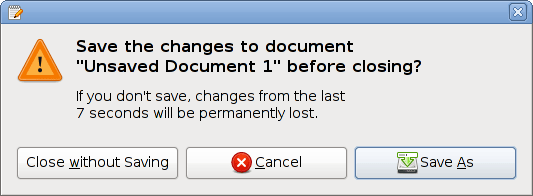
I’ll grant you need a different writing style when writing technical documentation; after all, there are no earthshaking benefits from clicking on the “Save As” button.

By Later version were uploaded by Bruce89 at en.Wikipedia. – Transfered from en.Wikipedia; en:File:Dialog1.pngtransfered to Commons by User:IngerAlHaosului using CommonsHelper., GPL, https://commons.wikimedia.org/w/index.php?curid=8988455

But you need different writing styles for the different types of marketing output anyway. The mechanics of writing a tweet differ from the mechanics of filming a video. So a marketer who isn’t experienced in technical documentation can adjust to the new style.

However, finding marketers slash technical documentation writers in the wild is unusual. Every company that I’ve worked with since 1991 has built some type of wall between the marketing function and the technical documentation function. But oddly enough, one of my former employers (MorphoTrak) moved managers around between the different functions. One manager in particular headed up the technical documentation group, then headed up the proposals group (where I worked for her), then headed up a multi-functional marketing team (where I worked for her again), then specialized in product marketing.

And now the product marketer (not the one from MorphoTrak, but the one I had been talking to) got the hamster in my brain to start generating ideas.

If omnichannel marketing is limited, and your omnichannel efforts should include activities outside of marketing such as technical documentation, what else should be included in your omnichannel efforts?

Including proposal writing in omnichannel efforts

OK, the subtitle gave it away. (But I refused to write the subtitle “This marketer wrote a user guide. You won’t believe what he did next!”)

If anything, proposal writing is closer to marketing than technical documentation is to marketing. While proposal writing is often considered a sales function (though some would disagree), there are obvious overlaps between the benefits that you espouse in a proposal and the benefits that you espouse in a case study.

Including standard proposal text/template creation as part of your omnichannel efforts also helps to ensure consistency in your product messaging. Again, if your data sheet says one thing, and your user guide says the same thing, then your proposal had better say the same thing also. (Unless you’re proposing something that won’t be implemented for another one or two years, in which case the proposal will discuss things that won’t appear in the present data sheets and user guides, but in future versions.)

Now those of you who are familiar with what Bredemarket does can appreciate why I love this idea.

By Loudon dodd – Own work, CC BY-SA 3.0, https://commons.wikimedia.org/w/index.php?curid=7404342

I’ve positioned Bredemarket as a two-headed (but not two-faced) marketing and writing service provider: for example, with separate descriptions of my status as a biometric content marketing expert and a biometric proposal writing expert. And that pretty much mirrors how I work. With one exception, most of my clients only use me for either my proposal services or my content marketing services.

What if companies entrusted Bredemarket with their total solution, both inside and outside of traditional marketing?

Of course there are complications in implementing this.

But when can you implement true omnichannel efforts?

Now most companies are ill-fitted to have one person, or even one department, handle all the omnichannel marketing (case studies, white papers, data sheets, tweets, LinkedIn posts, competitive intelligence, etc.) AND all the omnichannel non-marketing (technical documentation, proposals, and all the other stuff that my hamster brain didn’t realize yet).

So how do you get multiple departments to communicate the same messaging? It’s a difficult task, especially since most department members are so focused on their own work that they don’t have the bandwidth to worry about what another department is doing. (“I don’t care about the data sheet error. I just write the manuals.”)

There are several ways to achieve this: central ownership of the messaging for all departments, outside quality audits, and peer-to-peer interdepartmental review come to mind.

But you’re not going to solve the problem of inconsistent messaging between your departments unless you realize that the problem exists…and that “omnichannel marketing” won’t solve it.

On managing customer relationships as a sole proprietor

The intriguing part about running your own business is that you have to perform ALL of the business functions, including sales. Bredemarket does not have access to an expert commissioned sales staff; it just has access to me. (There is a separate third party service that looks up work for me, but even there I have to perform the sales function.)

When I developed my checklist of all of the things that I needed to do to start Bredemarket (latest checkoff – my City of Ontario business license has formally been approved), one of the items on the list was to obtain access to a customer relationship management (CRM) system. This would provide me with two benefits:

  • First, I could obviously track sales and marketing activities in the CRM.
  • Second, I could tell potential clients that I had SEVERAL HOURS of CRM administration experience. (Impressive, huh?)

Seriously, I I did have limited access to Salesforce and another CRM in one of my previous jobs, but never to the level of configuring the thing to meet my needs. Now I would have my chance, and learn a little bit in the process.

Actually, I had already been performing CRM in a not-so-elegant way. I’m using a Microsoft Excel workbook to track my contacts for my effort to gain full-time employment, and I was also listing contracting conversations in that same workbook. But when I decided to separate my efforts to obtain full-time employment from my contracting efforts, it also made sense to separate the contracting CRM data and move the Bredemarket tracking to a REAL CRM.

I ended up selecting the free version of HubSpot to use as Bredemarket’s CRM. (For those of you who have seen references to Mailchimp on my home page, that is for a separate mailing list not associated with the CRM.) I configured some essential items, linked to other services, entered a list of contacts with whom I had spoken over the last couple of months, and then prepared my “Announcing Bredemarket” email and the list of contacts who would receive it.

By the time I had prepared my list, and edited my email, it was already early afternoon Pacific Daylight Time. Now I had to start thinking about WHEN I would send the email. I seemed to recall that mornings were the recommended time to send emails, and I confirmed my understanding by reading this CoSchedule blog post. (10am appears to be the sweet spot.) But CoSchedule also linked to a WordStream post that included some of the same advice, but then said:

That’s the Advice. Now Ignore It.

-Megan Marrs

Two facts about the list for this mailing are relevant.

  • This was not an email list that I had purchased. This was a list of people whom I had interacted with personally over the last few months, often after they were finished with their work for the day. If they received the email at 10am, they might wait to read it until the evening anyway.
  • Many of these “recommended email times” studies do not account for the fact that emails are sent to multiple time zones. While I was sending my email from the Pacific Daylight Time zone, some recipients were in the Central Daylight Time and Eastern Daylight Time zones, and one recipient was in the Central European Summer Time zone.

So after some more re-edits of the email, I decided that there was no need to wait until tomorrow morning to send it. So I sent it at 4:45 pm Pacific Daylight Time. (For those keeping score, that’s 01h45 in Central Europe.) I figured that a few people might read the email that evening, and that the rest would see it when they opened their inbox the next morning.

As HubSpot send the email to the recipients, HubSpot started churning its data.

  • Most of the emails were delivered immediately (one remained in a “Sent” status for a while and wasn’t delivered for a few hours).
  • People started opening the emails.
  • People started clicking on the links to the emails.
  • People started sending email responses.

This is all old hat to people who HAVE been CRM administrators, but to me it was all novel.

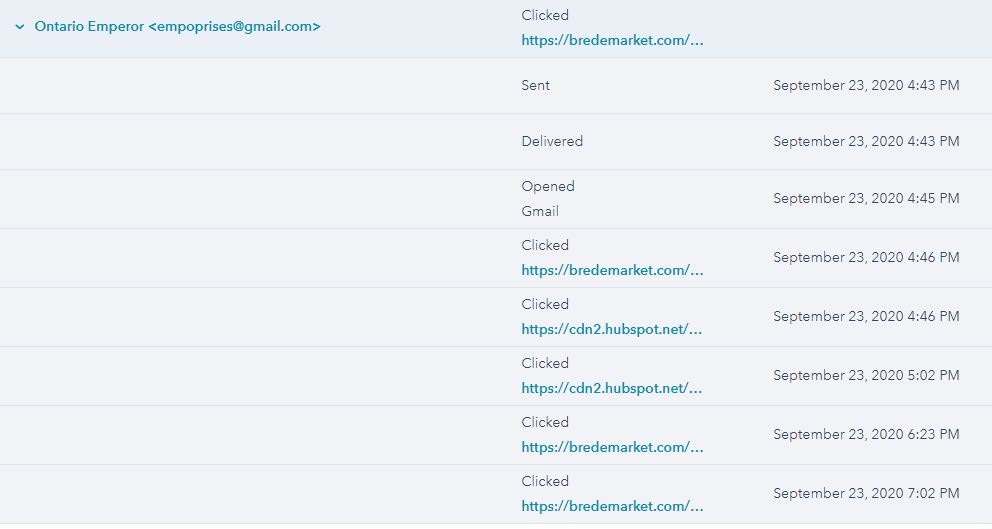
Now I could get really fancy and look at advanced analytics, but for my purposes I just needed to know the basics. I’ll show you an example – I included one of my own email accounts on the mailing list, and here is the information that HubSpot provided for the delivery to that email address.

I had several clickable links in the email, and HubSpot told me which of those links my alter ego clicked, and the time that they were clicked.

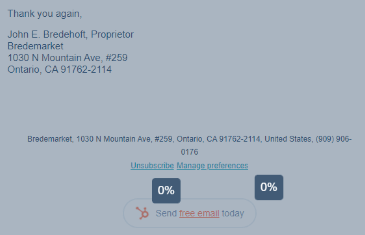
In addition to viewing individual activity, you can view summary activity for all of the recipients. Even if you’re not performing complex Tableau analyses of the data, the summaries can show you some basic things. For me, one key metric is the Unsubscribe metric – the percentage of those people who never want to receive an email from Bredemarket again. The heat map of the email displays the percentage of clicks on various links, including the Unsubscribe link. I am happy to report that as of right now – 16 hours after I sent the email – my unsubscribe rate is 0%.

So I’ve gone from minimal exposure to a CRM to a basic understanding of what a CRM can do. Hopefully I can use this to serve my potential Bredemarket clients better.

Now I just wish that I had used a CRM for my full-time employment search from day one. Maybe I’d be off of COBRA by now.