Gripping my Conference Planning Papers

While Bredemarket as an entity has only officially worked one trade show, my personal trade show, conference, and exhibition experience extends back years.

My years of session and speaker coordination 

For example:

In a past life I was tasked with session and speaker coordination for an annual conference. Dozens of sessions, dozens of speakers, probably about a dozen rooms, a myriad of microphone and table and cable setups, a little under a week…plus a dozen planners and dozens of employees and third-party conference staff.

There were many ways in which things could go wrong:

  • What if a demonstrator wanted to show an application on their iPhone, but you only had one-stage cables for a Windows laptop?
  • What if a keynote speaker wanted to show an application video as part of their remarks, but the audio-visual staff hadn’t tested the video yet? (Back in the day I worked with Sardis Media. They are magicians.)
  • What if an executive had an inspired idea to move one of our main room speakers to Wednesday morning…right when the speaker was conducting a workshop? (Human cloning was not an option.)
  • Worst yet, what if a speaker fell ill before boarding their flight to the conference venue…and we now had a big gaping hole the next morning?

Some of these things didn’t happen, but they could have…and if they did, it meant disruption of my “three chairs and 2 mics on the main stage on Tuesday at 8:45” meticulously made plans.

I excelled at session and speaker coordination

Yes, plans. I had them.

This was one of the times in which I fell back to Excel as my go-to project management tool, capturing all the necessary data, making it filterable and sortable. 

The years have faded my memories of the details I tracked, but I needed to know session titles, dates and times, rooms, speakers, panelists, presentations, videos, live demos, on-stage chairs and tables, handouts, and other things besides. 

This speaker could use the podium mic. And he had the conference app.

And that was just for DURING the conference. BEFORE the conference I needed to ensure that session abstracts and speaker biographies were written and found their way to the printed conference program, the registration website, and the conference app.

This was also one of the times that I heavily relied on the color printer that was hidden away in the conference organizers’ area. And it had to be color, because some schedule items were green, some yellow…and some red.

The schedule was constantly revised. And as the week wore on and the days dwindled down to a precious few, I would hide the older rows on my schedule and literally lighten my workload.

I would grip the latest iteration of my private master schedule and race around the conference hotel—sometimes the Hilton Orange County/Costa Mesa, sometimes another—checking things off my checklist. (All names are fictional.)

  • Hey, John, could you get your presentation to the Sardis folks by noon today? And you decided not to show that video, right?
  • Paul, the handouts for your workshop should be in the Guasti Room…I’m sorry, your session is in the Etiwanda Room. The handouts will be in the Etiwanda Room a half hour before your workshop.
  • George, you will be mic’ed up before the session…right?
  • Ringo! Side room. Five minutes. We need a raffle winner before 10:30.

By mid afternoon Thursday the last large sessions were done, the last workshops were wrapping up, the last raffle prizes were given away, and all that was left was the final banquet. Plenty could go wrong there, also, but that’s not part of this story.

And Ringo’s real name was Sharon.

Razor and Blades as a Service: HP Instant Ink

You know the razor and blades business model, where you can buy the razor very cheaply, and then you spend a lot of money over the years buying the blades.

Of course, this business model also applies to other complementary products, such as game consoles and video games, and printers and ink.

Ink as a Service

And companies can extend the business model. Rather than buying individual razor blades, video games, and ink cartridges, you can obtain the complementary products “as a Service.”

For example, HP Instant Ink:

“HP Instant Ink is the hassle-free, money-saving ink subscription service that automatically delivers ink only when you’re running low. Plans start at $1.79 a month.”

Of course that price assumes you only print 10 pages a month, but whatever.

I won’t dwell on the specifics on the plan (charging by the page rather than the ink used, reducing your privacy by letting HP and whoever else know when you print 900 pages, etc.). 

Vendor benefits from as a Service

But I will note that HP instant Ink has the same vendor advantage as any other “as a Service” offering:

Increased customer lock-in.

I will speak from my own experience. 

  • When my company sold on-premise solutions to government agencies, they paid from their capital budget and the contract was for a fixed term. After 5 or 7 years or whatever when the contract term expired, the agency’s hardware would be antiquated and it would have to go out to bid again.
  • Later, when my company sold cloud solutions, there was more budgetary flexibility. Some agencies didn’t have to use capital funds; this was a service, after all. And if the vendor was really fortunate, there was no contract term limit either, so the agency could stay with the vendor forever. Obsolescence wasn’t an issue because Amazon or Microsoft took care of that behind the scenes.

HP Instant Ink isn’t a perfect parallel, since it doesn’t include obsolete printer replacement. (But it could.) But the Ink as a Service (IaaS) offering certainly helps lock you in to HP…and to using HP ink rather than third-party ink.

And it’s yet another move from people owning things to people licensing things.

But if it provides a benefit (HP Instant Ink claims “up to” 50% cost savings), then it may be worthwhile.

(Imagen 3)

TMA (Too Many Acronyms): DPI vs. DPI

I recently wrote a post that concluded as follows:

By the way, when talking about digital images, Adobe notes that the correct term is pixels per inch, not dots per inch. DPI specifically refers to printer resolution, which is appropriate when you’re printing a fingerprint card but not when you’re displaying an image on a screen.

It’s a safe bet that older readers of Biometric Update—those who used printers to print out fingerprint cards based upon captured digital images—are familiar with the DPI (dots per inch) acronym.

So perhaps those readers, like me, were confused by the title of a recent Biometric Update article, “DPI is the new ‘global tech bet’ and these are the five core motivations for adoption, researchers say.”

What happened to the paperless office? All the police agencies got rid of their file cabinets of cards, and now they’re supposed to adopt DPI again?

Well you know sometimes acronyms have two meanings.

In this case, DPI stands for digital public infrastructure, a key component of smart cities.

And those five core components are fiscal resilience, public services, economic development, national sovereignty, and competition and rent extraction.

Although you would think that SMART people could come up with a better term than rent EXTRACTION.

For more information on those core components, read the Biometric Update “DPI” article.

And no, I shouldn’t cast stones at acronym misuse, since I’m a self-identified CPA. You can’t account for hypocrisy.

Baby Steps Toward Order of Magnitude Increases in Fingerprint Resolution

(Part of the biometric product marketing expert series)

For many years, the baseline for high-quality capture of fingerprint and palm print images has been to use a resolution of 500 pixels per inch. Or maybe 512 pixels per inch. Whatever.

The crime scene (latent) folks weren’t always satisfied with this, so they pushed to capture latent fingerprint and latent palm print images at 1000 pixels per inch. Pardon me, 1024.

But beyond this, the resolution of captured prints hasn’t really changed in decades. I’m sure some people have been capturing prints at 2000 (2048) pixels per inch, but there aren’t massive automated biometric identification systems that fully support this resolution from end to end.

But that may be changing.

One important truth about infant fingerprints

For about as long as latent examiners have pursued 1000 ppi print capture, people outside of the criminal justice arena have been looking at fingerprints for a very different purpose.

Our normal civil fingerprint processes require us to identify people via fingerprints beginning at the age of 18, or perhaps at the age of 12.

But gow do we identify people in those first 12 years?

More specifically, can we identify someone via their fingerprints at birth, and then authenticate them as an adult by comparing to those original prints?

It’s a dream, but many have pursued this dream. Dr. Anil Jain at Michigan State University has pursued this for years, and co-authored a 2014 paper on the topic.

Given that children, as well as the adults, in low income countries typically do not have any form of identification documents which can be used for this purpose [vaccination], we address the following question: can fingerprints be effectively used to recognize children from birth to 4 years? We have collected 1,600 fingerprint images (500 ppi) of 20 infants and toddlers captured over a 30-day period in East Lansing, Michigan and 420 fingerprints of 70 infants and toddlers at two different health clinics in Benin, West Africa.

At the time, it probably made sense to use 500 pixel per inch scanners to capture the prints, since developing countries don’t have a lot of money to throw around on expensive 1000 ppi scanners. But the use of regular scanners runs counter to a very important truth about infants and their fingerprints. Are you sitting down?

Because infants are smaller than adults, infant fingerprints are smaller than adult fingerprints.

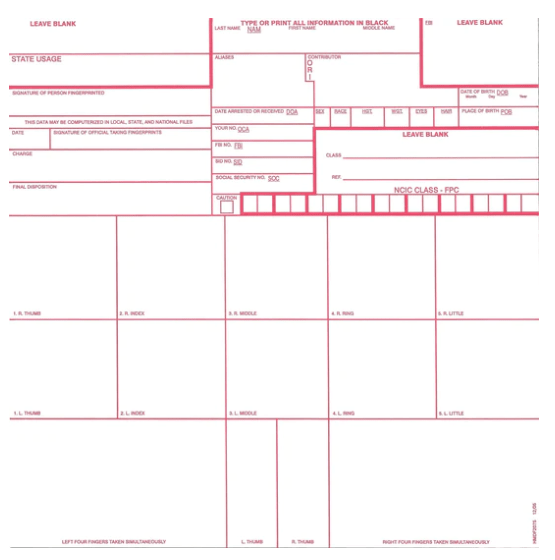
Think about it. The standard FBI fingerprint card assumes that a rolled fingerprint occupies 1.6 inches x 1.5 inches of space. If you were to roll an infant fingerprint, it would occupy much less than that. Heck, I don’t even know if an infant’s entire FINGER is 1.6 inches long.

So the capture device is obtaining these teeny tiny ridges, and these teeny tiny ridge endings, and these teeny tiny bifurcations. Or trying to. And if those second-level details can’t be captured, then you’re not going to get the minutiae, and your fingerprint matching is going to fail.

So a decade later, researchers today are adopting a newer approach, according to a Biometric Update summary of an ID4Africa webinar. (This particular portion is at the very end of the webinar, at around the 2 hour 40 minute mark.)

A video presentation from Judge Lidia Maejima of the Court of Justice of Parana, Brazil introduced the emerging legal framework for biometric identification of infants. Her representative Felipe Hay explained how researchers in Brazil developed 5,000 dpi scanners, he says, which accurately record the minutiae of infants’ fingerprints.

Did you capture that? We’re moving from five hundred pixels per inch to FIVE THOUSAND pixels per inch. (Or maybe 5120.) Whether even that resolution is capable of capturing infant fingerprint detail remains to be seen.

And as Dr. Joseph Atick noted, all this research is still in its…um…infancy. We won’t know for years whether the algorithms can truly match infant fingerprints to child or adult fingerprints.

By the way, when talking about digital images, Adobe notes that the correct term is pixels per inch, not dots per inch. DPI specifically refers to printer resolution, which is appropriate when you’re printing a fingerprint card but not when you’re displaying an image on a screen.

(Image from From https://nvlpubs.nist.gov/nistpubs/SpecialPublications/NIST.SP.500-290e3.pdf )